Key Takeaways
- Copper costs $23, $59 or $99 per seat a month on annual billing. Pay monthly and the same three plans cost $29, $69 and $134 per seat (checked 2026-11-18).
- There is no free plan. You can activate an account without a card, but Copper's pricing page never states how many days the trial runs.
- The contact cap sets your plan more often than the feature list does. Basic stops at 2,500 contacts, Professional at 15,000, and only Business is unlimited.
- The "up to 26% off" annual badge only describes the Business plan. On Professional the annual discount is 14.5%, and on Basic it is 20.7%.
- Reporting, integrations and workflow automation all start at Professional, so for most teams the honest entry price is $59 per seat, not $23.
Copper sells one idea: a CRM that lives inside Gmail and fills itself from the mail you already send. Three per-seat plans, no free tier, which makes it look easy to budget. It isn't, because two of the three numbers on the price card stop mattering once you read what each plan can do.
The figures below come from Copper's own pricing page, read on 18 November 2026, with the seat math for teams of one, three, five and ten.
How much Copper CRM costs
Copper CRM costs $23, $59 or $99 per seat a month on annual billing. Copper prices per seat, in US dollars, and excludes taxes and fees.
| Plan | Price |
|---|---|
| Basic (annual / monthly) | $23 per seat a month / $29 per seat a month |
| Professional (annual / monthly) | $59 per seat a month / $69 per seat a month |
| Business (annual / monthly) | $99 per seat a month / $134 per seat a month |
Copper's pricing page carries a badge promising up to 26% off for annual billing. Run the three pairs and that number belongs to one plan. Business drops 26.1%, from $134 to $99. Professional drops 14.5%, from $69 to $59. Basic drops 20.7%, from $29 to $23.
Professional is the plan most teams land on, and it has the weakest annual discount. A year's commitment there buys a 14.5% saving and costs you the ability to leave in a month. The same commitment on Business buys the full 26%.
What Copper costs at 1, 3, 5 and 10 seats
Annual billing, twelve months, in US dollars.
| Seats | Basic | Professional | Business |
|---|---|---|---|
| 1 | $276 | $708 | $1,188 |
| 3 | $828 | $2,124 | $3,564 |
| 5 | $1,380 | $3,540 | $5,940 |
| 10 | $2,760 | $7,080 | $11,880 |
Pay monthly instead and five seats on Business cost $8,040 a year rather than $5,940. That $2,100 gap is the biggest lever on a Copper invoice, bigger than any plan feature you will argue about internally.
Five seats on Professional, the realistic middle case for a small sales team, is $3,540 a year on annual billing or $4,140 on monthly. Before you sign either, see what the same money buys when the CRM and the booking page come from one vendor: you can set up a pipeline and a booking link on one account in a few minutes and run it beside your Copper trial.
The contact cap is the real cost driver
Every Copper write-up mentions the 2,500-contact limit on Basic. Almost none of them connect it to the feature sitting two rows above it on the same price card.
Copper's Basic plan includes contact enrichment, and its Google Workspace rows include Google Contact Sync, which Copper describes as automatically capturing contact information from the people you are talking to. That is the product working as sold. It also means your contact count grows from your inbox, not from your pipeline.
So the 2,500 slots do not fill with 2,500 prospects. They fill with everyone who ever emailed your shared address: the recruiter, the hosting provider, the wrong-number enquiry from March. A two-person agency on Gmail can cross the cap inside a year without adding a single deal.
When that happens, the upgrade is not from Basic to Basic-plus-more-contacts. It is from $23 to $59 per seat, because Professional is where the next contact tier lives. For a team of five, that is $2,160 more a year, triggered by inbox volume rather than by a decision anyone made about sales process.
Two practical consequences:
- Audit before you commit to annual Basic. Export your Google Contacts and count them. If you are within a few hundred of 2,500, price Professional and skip the detour.
- Decide what gets into the CRM. If Copper captures automatically, someone needs a rule for what gets archived, or the cap becomes a recurring budget event.
Teams that want contact records without a ceiling end up looking at CRM options built for small businesses, where the limit is on seats rather than on rows.
What you get on each Copper plan
Basic, $23 annual or $29 monthly
Pipelines, project management, task automation and contact enrichment, with a 2,500-contact ceiling. Task automation here means Copper creates a follow-up task after something happens in a record. It is not workflow automation, which is a different row on a different plan.
What is missing is the part most buyers assume is included: no reporting, no integrations, no bulk email. Basic is a searchable contact database with a deal board on top. Enough for a solo consultant who wants Gmail to remember things, not enough for anyone who has to report a pipeline number to someone else.
Professional, $59 annual or $69 monthly
Everything in Basic, plus a 15,000-contact ceiling, workflow automation, bulk email, reporting and integrations. This is where Copper becomes a sales tool rather than an address book.
Integrations matter more than the word suggests. Copper's integration story runs largely through Zapier, which Copper's own page describes as the route to 5,000-plus other apps, and it sits on this plan. If your stack depends on pushing Copper data anywhere else, Professional is your floor, and the $23 number on the price card was never for you.
Business, $99 annual or $134 monthly
Unlimited contacts, email series, custom reports, multi-currency and premium support. Email series is the first point where Copper will nurture a contact over time rather than send one bulk message, and custom reports are the first point where you can build a view Copper didn't ship.
At $99 per seat on annual billing, Business costs more than the top tier of most pipeline-first CRMs for small teams. You are paying for the Gmail-native experience and for the contact ceiling disappearing. If neither is why you are buying, the plan is hard to justify.
Costs the price card doesn't show
- Onboarding and premium support are conditional. Copper lists personal onboarding with a consultant, and a customer success manager for success plans, as being for eligible Business and Professional annual tier accounts. Choosing monthly billing for flexibility also opts you out of the human help with setup.
- The trial length is unstated. Copper's pricing page repeats instant activation with no credit card required and never gives a day count. Plan your evaluation window on the assumption that it is shorter than you would like, and load real data early.
- Taxes and fees are extra. The page says prices are in USD and exclude taxes and fees where applicable, which for a European buyer means the invoice also carries VAT and a currency spread.
- There is no scheduling layer. Copper will sync your Google Calendar and log what happened. It will not give a prospect a link that books a slot, so a customer-facing team usually pays a second vendor for the booking page, the reminders and the no-show chasing.
- Reporting arrives a plan later than you expect. Teams that buy Basic to keep costs down and then need a pipeline report are the most common upgrade story on this price list, and the upgrade is 2.6 times the price.
Where Copper earns its price, and where it doesn't
Where Copper is worth paying for
- The Gmail sidebar removes most of the manual data entry that kills CRM adoption in small teams.
- Contact and company records build themselves from mail, calls and texts, so the history is there without anyone maintaining it.
- Pipelines are easy to reshape as the sales process changes, which matters more in year two than any feature on the card.
- The project-management side is on every plan, so client delivery and the sales pipeline can live in the same tool.
- Google Workspace coverage is deep: Gmail, Calendar, Contacts, Drive, plus a Sheets and Looker Studio route for reporting.
Where Copper falls short for the money
- Reporting draws the most complaints, specifically how hard it is to filter data back out.
- Deleted records cannot be recovered, which is a sharp edge on a tool that captures data automatically.
- The mobile app draws complaints about notification lag and occasional loading and search errors.
- Email automation beyond bulk send and email series is thin, so teams often keep a separate sending tool.
- The entry plan has no reporting at all, which makes the cheapest price on the card misleading for most buyers.
Who should pay for which plan
Basic. A solo operator or a two-person team who live in Gmail, sell by conversation, and need contact history rather than forecasting. Audit your contact count first.
Professional. The default for a small sales or client-services team: a reporting line, automation and a route into the rest of your stack. Treat $59 per seat as Copper's real price.
Business. Teams past 15,000 contacts, teams invoicing in several currencies, or teams that need custom reports and a named success contact. Also the only plan where the 26% annual discount is real.
Nobody, if your team is not on Google Workspace. Copper's advantage is the Gmail surface, and paying for it from Outlook is paying for the part you don't use.
Copper customer reviews
Copper holds 4.5 out of 5 from 1,152 reviews on G2, 4.4 out of 5 from 622 reviews on Capterra, and 8.7 out of 10 from 132 reviews and ratings on its TrustRadius listing (all three read 2026-11-18). Strong scores on real sample sizes, and small businesses make up the large majority of the G2 reviewer base, so they reflect the buyer this price list is aimed at. Treat the TrustRadius number as the softest of the three: its own comparison pages show the score anywhere from 7.1 to 8.7 depending on which review subset the page is filtering.
The praise is consistent and specific: the Gmail extension cuts data entry, call and email history lands on the contact by itself, pipelines are easy to restructure, and the activity log gives an owner visibility into what the team did that day. Reviewers also rate the onboarding experience and the mobile app for working away from a desk.
The complaints cluster just as tightly, and one of them is measurable: TrustRadius scores Copper's reporting and analytics at 7.9 out of 10 across 55 ratings, with its customisable-reports sub-score at 7.5, below the product's overall 8.7. In the written reviews that shows up as reporting being clunky and filtering the data back out being hard. Bugs appear in search and load times, records deleted by accident are gone for good, and a minority of reviewers report multi-day support waits.
The pattern is a tool people like using and fight with when they need numbers out of it. Worth knowing before you choose between Basic at $23 and Professional at $59, because reporting is the line between them.
Copper's price next to other small-team CRMs
Each vendor's own list price, checked 2026-11-18. Copper bills in US dollars and the two below in euros, so read this as orders of magnitude rather than an exchange-rate comparison. Only three tools carry figures because HubSpot's and Salesforce's price pages render their numbers in script this check could not read, and a CRM price taken from anywhere but the vendor's own page ages badly.
| Tool | Entry paid plan | Mid plan |
|---|---|---|
| Copper | $23 per seat a month (annual) | $59 per seat a month (annual) |
| Pipedrive | €14 per seat a month (annual) | €39 per seat a month (annual) |
| meetergo | €12.90 per person a month (annual) | €99 a month for 3 people (annual) |
Copper's entry plan is the most expensive of the three and the most limited, because the other two put reporting and automation lower down their price lists. For the full breakdowns there are separate pieces on what each Pipedrive plan costs and on HubSpot's pricing, which also has a free CRM tier worth knowing about if budget is the deciding factor.
One thing none of these per-seat numbers includes is the booking layer. If your CRM's job is to track meetings that clients book themselves, the calendar side has to come from somewhere, and connecting a CRM to the calendar properly is usually the second invoice nobody budgeted for.
meetergo: the CRM and the booking page on one bill
meetergo is a German platform for small customer-facing teams where the CRM sits next to the booking page, the forms and the invoices rather than beside them in a second subscription. The relevant difference for a Copper shopper is where the data comes from: in Copper the contact record builds itself from mail, and in meetergo it builds itself from bookings and form submissions, which means the record starts with an appointment attached.
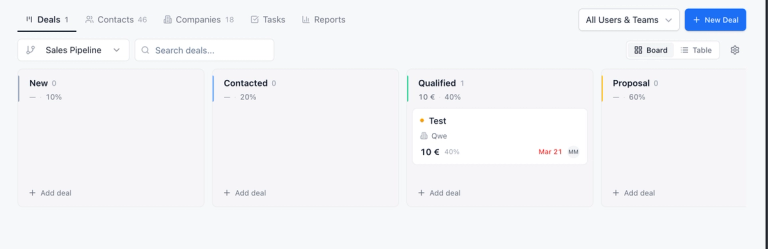
The pipeline fills from bookings, not from your inbox
Whoever books a slot or submits a form becomes a contact. Meetings, mails and chats from WhatsApp, Instagram, Telegram and website chat collect on that same record. Deals move through your own stages by drag and drop, with a win probability per stage and a loss reason when one closes out, and meetergo flags a deal that has sat in one stage too long.
Contacts without a ceiling
meetergo prices by person, not by contact row, and states no contact limits across the plans. For a team watching Copper's 2,500-contact line, that removes the upgrade trigger entirely: your bill changes when you hire, not when your inbox gets busy.
Capture without typing, and reporting on every plan
A Chrome extension saves a LinkedIn profile to the CRM in one click, and at an event you can scan a business card or an NFC badge from your phone, offline included, then leave a voice note that gets transcribed into field values. Weighted forecast, average sales cycle, average won deal value and a demo-to-proposal rate come straight from the pipeline, with no plan where the reports are switched off.
Booking, reminders and signatures in the same account
Appointment scheduling is part of the product rather than a connected app, so booking links, reminders, round robin for a team and e-signatures run on the same login as the pipeline. If you work in Gmail and Google Calendar, meetergo's Google Workspace integration covers the same calendar and mail sync that pulled you toward Copper.
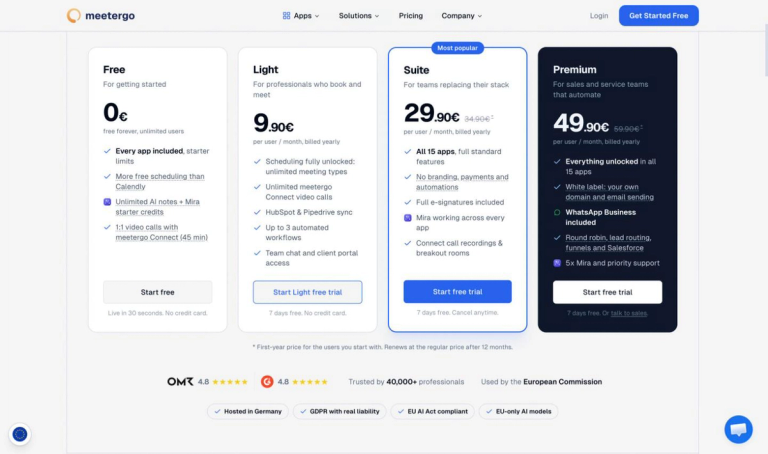
| Plan | Price |
|---|---|
| Free | €0 a month, up to 3 people, free forever |
| Light | €12.90 per person a month (annual billing) |
| Suite | €99 a month, 3 people included (annual billing) |
| Premium | €179 a month, 3 people included (annual billing) |
| Premium Solo | €49.90 a month for 1 person (annual billing) |
Prices read from meetergo's pricing page on 2026-11-18 and exclude VAT. The CRM is included from the Free plan, which caps at three people. Paid plans come with a 7-day trial and no card, and the free plan has no time limit: two different things that vendors often blur into one.
Where that lands against Copper: three people on Copper Professional is $177 a month on annual billing, and three people on meetergo Suite is €99 a month with the booking page, forms, e-signatures and invoicing in the same plan. Three people on meetergo Light is €38.70 a month, with the CRM and no contact limit, if you don't need the inbox and invoicing side.
Where meetergo is the wrong answer. It has no lead scoring and no saved segments, which meetergo states plainly on its own CRM page. If your sales process depends on scoring inbound leads or working stored segments, keep the CRM you have; meetergo will push contacts, deals and appointments into HubSpot and Pipedrive from the Light plan and into Salesforce on Premium instead. On the Free plan you also live with the meetergo logo on your booking pages, three meeting types, no round robin and no automations.
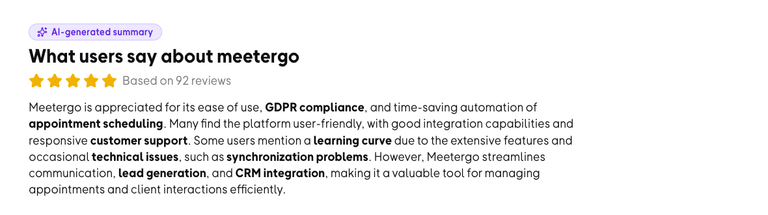
meetergo's own pages show a 4.8 review rating and over 50,000 customers (checked 2026-11-18), with servers in Nuremberg and GDPR compliance out of the box. That last part is what decides it for teams who cannot put client records on US-owned infrastructure.
Run your CRM and your booking page on one plan.

Run your CRM and your booking page on one plan.
Is Copper CRM worth the price?
If your team is on Google Workspace, sells through conversations in Gmail, and will never need much more from reporting than a pipeline view, Copper is worth $59 per seat a month. The automatic capture is the real product, and no amount of discipline makes manual CRM entry work in a five-person team.
If you bought the $23 number, read the plan rows again. Basic has no reporting, no integrations and a 2,500-contact ceiling that Copper's own Gmail sync works against. And if the meetings on your calendar get booked by clients rather than set by your reps, a CRM without a booking layer is two invoices pretending to be one. That is the case where a CRM with scheduling built in costs less than the stack it replaces: read what meetergo's CRM does with a booked appointment, then put a pipeline and a booking link on one account before you sign anything with Copper.
Copper CRM pricing FAQ
Does Copper CRM have a free plan?
No. The cheapest option is Basic at $23 per seat a month on annual billing or $29 monthly. Copper lets you activate an account without a credit card, which is a trial rather than a free tier. If a no-cost CRM is the requirement, the free CRM options worth considering are a better starting point.
How long is the Copper free trial?
Copper's pricing page does not say. It states instant activation and no credit card required without giving a number of days, so treat the window as short and import real contacts on day one.
Is there still a Copper Starter plan at $9 or $12?
Not on the current price list. Copper's pricing page shows three plans only: Basic, Professional and Business. Guides that still quote a Starter tier with a 1,000-contact cap are describing an older price card.
What happens when you pass Copper's contact limit?
The limits are 2,500 contacts on Basic and 15,000 on Professional, with Business unlimited. Passing the Basic ceiling means moving to Professional, which is $59 per seat a month on annual billing rather than $23, so the contact count sets your price more directly than the feature list does.
Can you pay for Copper monthly?
Yes, at $29, $69 or $134 per seat a month. Monthly billing costs 14.5% to 26.1% more depending on the plan, and Copper restricts personal onboarding and premium support to eligible Professional and Business accounts on annual terms.
Does Copper include a meeting scheduler?
No. Copper syncs with Google Calendar and logs meetings onto the contact record, but it does not provide a booking link that lets a client pick a slot. Customer-facing teams generally add a scheduling tool, which is a second per-seat cost on top of Copper.
Is Copper cheaper than Pipedrive?
Not at the entry level. Pipedrive's Lite plan is €14 per seat a month on annual billing against Copper's $23, and Pipedrive's Growth plan at €39 includes the email sync, automation and scheduling features that Copper gates at $59 (both checked 2026-11-18). Copper's argument is the Gmail-native experience, not the price.
Which Copper plan gives the best value?
Professional, for most teams: the first plan with reporting, integrations and workflow automation, and the one with the 15,000-contact ceiling. It also carries the smallest annual discount, so paying monthly costs you less there than it does on Business.