
Key takeaways
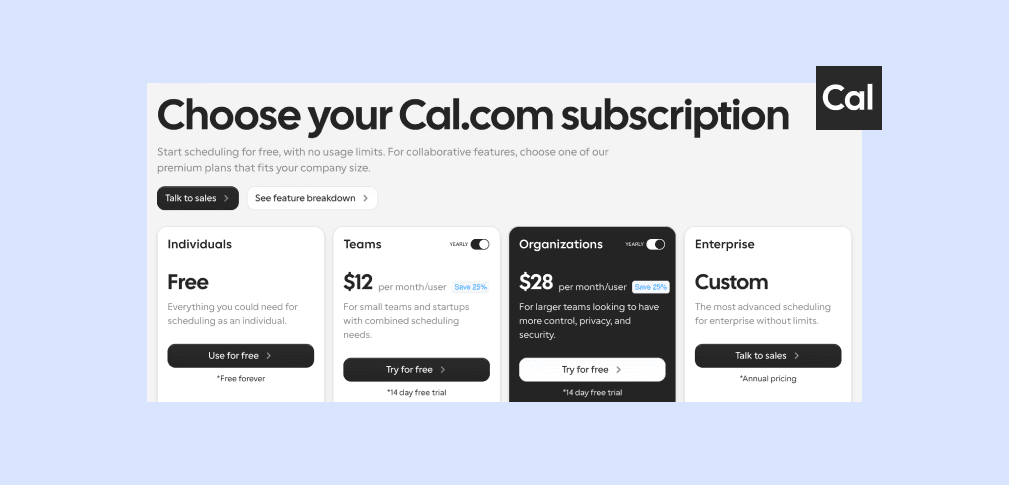
- Cal.com starts at $0 for one user and scales to $12 per user per month on Teams, $28 on Organizations, and a custom price on Enterprise (all billed yearly). The free plan is genuinely usable for solo scheduling, not a stripped trial.
- The open-source version is free to self-host, but "free" only covers the code. You still pay for the servers it runs on and the engineering hours to keep it patched and online.
- The costs that catch people out are usage-based and tier-gated. Cal.ai, the phone agent, runs $0.29 per minute beyond bundled credits, and routing, SSO, and SCIM only appear on higher plans.
- If EU data residency is your reason for looking at Cal.com, self-hosting is the only way to get it. meetergo delivers Nuremberg servers and a signed DPA on the hosted plan, starting free.
Cal.com pricing is easy to read straight off the page: $0 to start, $12 per user per month for teams, $28 for organizations that need more control. The complication isn't the table on the pricing page. It's everything that sits outside it, the self-hosting bill, the per-minute AI charges, and the features that quietly require a higher tier. This guide breaks down what each Cal.com plan actually includes, where the extra costs hide, and how the total compares once you add up the stack.
How Much Does Cal.com Cost?
Cal.com runs a four-tier hosted model plus a free self-hosted option. Annual billing saves 25 percent, so the headline prices below assume yearly payment. Month-to-month billing runs higher.
| Plan | Price |
|---|---|
Free | $0 forever (1 user) |
PlanFree Price$0 forever (1 user) | |
Teams | $12 / user / mo (billed yearly) |
PlanTeams Price$12 / user / mo (billed yearly) | |
Organizations | $28 / user / mo (billed yearly) |
PlanOrganizations Price$28 / user / mo (billed yearly) | |
Enterprise | Custom (annual) |
PlanEnterprise PriceCustom (annual) | |
Self-hosted | Free license, you pay infrastructure |
PlanSelf-hosted PriceFree license, you pay infrastructure | |

meetergo: A More Complete Alternative
If price-per-value is what you're weighing, meetergo is worth putting on the table before the breakdown. It's a Cologne-built scheduling platform that bundles what Cal.com leaves to add-ons and self-hosting:
- EU data residency by default: Nuremberg servers and a signed DPA on every plan, no self-hosting needed.
- An all-in-one stack: scheduling, encrypted video, payments, e-signatures, and a sales CRM under one subscription.
- A free Basic plan plus a 7-day trial on paid tiers, with paid plans from €7 per month.
| Tier | Cal.com | meetergo |
|---|---|---|
Free | $0 (1 user) | €0 Free (forever) |
TierFree Cal.com$0 (1 user) meetergo€0 Free (forever) | ||
Entry paid | $12 / user / mo | €9,90 / user / mo |
TierEntry paid Cal.com$12 / user / mo meetergo€9,90 / user / mo | ||
Team tier | $28 / user / mo | €29,90 / user / mo |
TierTeam tier Cal.com$28 / user / mo meetergo€29,90 / user / mo | ||
Start free → Live in 30 seconds, no credit card required.
Cal.com Pricing Plans: A Breakdown
Free ($0)
The free tier covers one user with unlimited event types, unlimited meetings, calendar connections, and double-booking prevention. For a freelancer or a solo consultant, it does the whole job without a paywall nudge every few clicks. This is the plan most individuals will stay on.
Teams ($12 / user / mo)
Teams adds the collaborative layer: round-robin scheduling, collective events, recurring events, and unlimited sub-teams, with a 14-day trial. It's priced just above Calendly's entry team tier but folds in routing that Calendly pushes to a higher plan. The catch is per-seat math, a 10-person team is $1,440 a year at the annual rate.
Organizations ($28 / user / mo)
Organizations is the "we need control" plan: attribute-based routing, member attributes, restriction schedules, SAML SSO, SCIM provisioning, and a dedicated database. At more than double the Teams price, it's the tier most growing companies actually land on once compliance and routing enter the picture.
Enterprise (Custom)
Enterprise removes limits and adds annual contracts, with pricing only on request. There's no public number, so budgeting means a sales call.
Self-Hosted (Free license)
This is Cal.com's signature move. The full application is open source on GitHub, deployable via Docker, running the same code as the hosted product. The license costs nothing. What it doesn't cover is the infrastructure underneath it or the time to run it, which is where the real cost lands (more on that next).
Cal.com's Hidden Costs
The pricing table is honest. The total cost of ownership is where teams get surprised:
- Cal.ai usage fees. The AI phone agent bills $0.29 per minute once you burn through the bundled credits (750 per member on Teams, 1,000 on Organizations). High call volume turns a flat subscription into a metered one.
- The self-hosting bill. Self-hosting is free to license, but you pay for servers, backups, monitoring, security patches, and the engineer-hours to keep all of it running. For most teams that's more expensive than the hosted plan, not less.
- Tier-gated essentials. Salesforce routing, SAML SSO, and SCIM provisioning live on Organizations or Enterprise. If your team needs them, your real entry price is $28 per user, not $12.
Integrations are the exception. We checked what the Cal.com apps cost on each tier: the Companion client and App Store installs are free on every plan, though Stripe, Zoom and HubSpot need their own account on the other end.
Cal.com Pros and Cons
Pros
- Open source and self-hostable, so you're never locked into one vendor's hosting decisions.
- A free tier that's actually capable for individuals, not a 14-day countdown.
- Built-in video through Cal Video, no separate Zoom subscription required.
- Developer-friendly, with a documented REST API and embeddable components for teams building scheduling into their own product.
Cons
- The hosted version routes through US-based infrastructure, so genuine EU data residency means taking on the self-hosting burden.
- No native e-signatures, and payments depend on Stripe rather than a built-in checkout with deposits.
- Lighter on DACH-specific connectors, with no German calendar providers (GMX, Posteo, mailbox.org) and no insurance-broker integrations.
Who Is Cal.com Best For?
Cal.com fits developers, SaaS founders, and agencies who value open-source flexibility and want to embed scheduling into their own apps. It suits privacy-conscious teams that have the engineering capacity to self-host and want to. And it's a strong pick for individuals who need a free, no-nonsense booking link.
It's a weaker fit if you need EU data residency without running your own servers, or if you want scheduling, video, payments, and contracts in one place rather than assembled from parts. If that's you, our roundup of Cal.com alternatives compares ten options side by side.
Cal.com Customer Reviews
Cal.com earns solid marks on G2, and the reviews track the same split as this guide: people value the open-source flexibility, while setup and the EU experience draw the complaints.
Price is only part of the picture. Our full Cal.com review grades the product as it stands in 2026, including the move to a private code base in April and the Cal.eu shutdown on 1 November.

Vaishnav V., a software engineer at a small business, rates it 3.5 out of 5. He credits how Cal.com pairs simple booking with deep customization (event types, durations, buffer times) and singles out the open-source transparency, but calls the initial setup overwhelming and the integration docs unclear.

Jacqui P., a designer, gives it 4 out of 5 for clean website integration and a privacy posture where she never feels like the product. Her complaint lands squarely on the EU point raised above: after a mobile-app update, the app routes to cal.com instead of the cal.eu instance where her account lives, locking her out on mobile. That cal.com-versus-cal.eu split is the same data-residency seam worth weighing before you commit. Both are public, validated reviews on G2.
Alternative to Cal.com: meetergo
If you're evaluating Cal.com mainly to keep data in the EU, meetergo reaches that goal without the ops project. It serves more than 40,000 users with EU data residency built in, Nuremberg servers and a signed DPA on every plan, including the free one. Where Cal.com leaves gaps, meetergo fills them in-product: native e-signatures (eIDAS-compliant), payments with deposits, encrypted video, and a sales CRM. Its AI assistant, Mira Mail, handles rescheduling inside the email thread rather than over a metered phone call. Teams that still want to host it themselves can, through meetergo's self-hosted option, and it ships 90+ integrations including the German calendar and insurance tools Cal.com skips.
| Tier | Cal.com | meetergo |
|---|---|---|
Free | $0 (1 user) | €0 Free (forever) |
TierFree Cal.com$0 (1 user) meetergo€0 Free (forever) | ||
Entry paid | $12 / user / mo (Teams) | €9,90 / user / mo (Light) |
TierEntry paid Cal.com$12 / user / mo (Teams) meetergo€9,90 / user / mo (Light) | ||
Mid tier | $28 / user / mo (Organizations) | €29,90 / user / mo (Suite) |
TierMid tier Cal.com$28 / user / mo (Organizations) meetergo€29,90 / user / mo (Suite) | ||
Top self-serve | Enterprise (custom) | €49,90 / user / mo (Premium) |
TierTop self-serve Cal.comEnterprise (custom) meetergo€49,90 / user / mo (Premium) | ||
Self-hosted | Free code, you host | Managed option available |
TierSelf-hosted Cal.comFree code, you host meetergoManaged option available | ||
In practice, one meetergo detail is worth flagging: the 7-day trial needs no credit card, and when it ends it auto-downgrades to the free Basic plan rather than locking the account. Your booking page and existing data stay live while you decide on a paid tier.
Get started free → No credit card required. Cancel anytime.
Is Cal.com Worth the Price?
For developers and teams that want open-source flexibility and have the appetite to self-host, yes, the price is fair and the free tier is one of the strongest in the category. The honest caveat is the residency math: if you're choosing Cal.com to keep data in the EU, the hosted plan won't get you there on its own, and the self-hosting cost belongs in your budget from day one. If you'd rather not run that project, an out-of-the-box EU alternative will cost less in total once you count the server time. If you're comparing scheduler pricing more widely, it's worth seeing how Calendly's pricing and Acuity's pricing line up too.
A detailed comparison of GDPR-compliant options is in the guide to Calendly alternatives.
One tool instead of four subscriptions

One tool instead of four subscriptions
Frequently Asked Questions
Is Cal.com free?
Yes. The Free plan costs $0 for one user with unlimited event types and meetings. Paid Teams plans start at $12 per user per month, billed yearly.
How much is Cal.com per user?
Teams is $12 per user per month and Organizations is $28, both billed yearly. Month-to-month billing costs more than the annual rate.
Is self-hosting Cal.com really free?
The software is free to license. You still pay for servers, maintenance, and security updates, which for most teams adds up to more than the hosted plan.
Does Cal.com charge extra for AI features?
Yes. Cal.ai, the phone agent, costs $0.29 per minute once you exceed the credits bundled with your paid plan.
Does the hosted version of Cal.com keep data in the EU?
Not by default. The hosted product runs on US-based infrastructure. EU residency requires self-hosting on your own European servers.
Cal.com vs Calendly pricing, which is cheaper?
Cal.com Teams ($12) sits just above Calendly's $10 entry tier but includes routing features Calendly gates to a higher plan, so the cheaper option depends on which features you need.
Pricing is not the only thing in flux: Cal.com has been weighing up whether to consolidate its European instance cal.eu into cal.com since July 2026. For what that would mean if you are on .eu, see From cal.eu to meetergo.