Key Takeaways
- A recorder and a note taker are two different purchases. Several of the best known tools in this category transcribe the conversation and then delete the audio. If you need to replay what a client actually said, check that the playable file survives before you pick on summary quality.
- Built-in recording is the cheapest route and the one with a clock on it. Microsoft Teams recordings carry a default expiration of 120 days (Microsoft Learn documentation, checked 17 November 2026), and only an admin can change it, for recordings made after the change.
- Free tiers cap storage more often than meetings. The Fireflies free plan transcribes without a meeting limit but holds 400 minutes of storage for the whole team and excludes video recording (fireflies.ai pricing page, checked 17 November 2026).
- Local recording is the only setup where the file never leaves your machine. A desktop recorder captures your microphone and the other side's audio on your own computer, works without internet, and puts nothing in a vendor's cloud.
- Consent is part of the setup, not an afterthought. In the EU a recording of identifiable people is personal data with a deletion deadline attached. In the United States, some states need every participant's agreement rather than just yours.
Three people searching for a meeting recorder want three different things. One wants a video file to send to a colleague who missed the call. One wants a searchable record of what a client agreed to. One wants to stop typing while someone talks. The tools that rank for the term serve all three, and they are not interchangeable: two of the most popular options in this comparison keep no audio at all once they have produced a transcript.
So the question that decides this is not which recorder has the best summaries. It is what you want to be holding a month later, and whether it will still be there. The short version: record in the platform you already pay for if you record occasionally, pick Fathom if you want free cloud recordings with summaries, pick a local desktop recorder if the audio must not leave your machine, and rule out the AI note takers that delete the audio if you ever need to replay a call. That is how the options below are sorted: by the artifact you keep, where the file sits, and when it disappears by default.
The eight options at a glance
| Option | What you keep | Where the file sits | Default retention | Entry price |
|---|---|---|---|---|
| meetergo | Transcript, AI minutes, plus a playable recording from Suite | Your own Mac or PC in local mode, otherwise the EU cloud | Recordings 180 days on Suite, 1 year on Premium | Free for up to 3 people |
| Zoom cloud recording | Video, audio and transcript | Zoom cloud, 10 GB per licence | Until you run out of storage | Free plan records locally only |
| Google Meet recording | Video in Drive | The organiser's Google Drive | Your Drive retention rules | Recording from Business Standard |
| Microsoft Teams recording | Video and transcript | The organiser's OneDrive, or channel SharePoint | 120 days, then the recycle bin | Included with paid Microsoft 365 business plans |
| Fathom | Recording, transcript and AI summary | Fathom's cloud | No stated limit on the free plan | Free, unlimited recordings |
| Fireflies.ai | Transcript and summary; video from Pro | Fireflies' cloud | 400 storage minutes per team on Free | Free, 400 storage minutes |
| Otter.ai | Transcript and audio playback | Otter's cloud | Last 25 conversations on Basic | Free, 300 minutes a month |
| Granola | Notes and transcript, no audio | Granola's cloud | Audio deleted after transcription | Free, 30 days of history |
| OBS Studio | A raw video file, nothing else | Your own disk | Forever, until you delete it | Free and open source |
| Recording hardware | An audio file on the device | The device, then the vendor's app | Depends on the app's plan | One-off device purchase |
All prices checked on the vendors' own pricing pages on 17 November 2026. The first three rows are the recorders you may already own, and they are covered together in section 1; the rest get a section each.
Four things people mean by "meeting recorder"
The category word covers four different outputs, and most of the frustration in it comes from buying one and expecting another.
A playable recording. Video or audio you can scrub through and replay. This is what the word suggests and what the fewest tools in the category actually give you on a free plan.
A transcript. Text of who said what, searchable, usually with speaker labels. A transcript answers "what did we agree" faster than a recording does, and speaker separation in transcription is what makes it readable at all when four people talk.
AI minutes. A structured summary with decisions, action items and next steps, generated from the transcript. Useful for circulating, not useful as evidence.
Notes without audio. Some tools listen to the meeting, write the notes, and delete the recording in the same breath. That is a deliberate privacy design, and it also means there is nothing to go back to.
A tool can do all four. Most do two. Decide which one you need to still have in a month, then read the retention column rather than the feature list.
1. Built-in recording: what Zoom, Google Meet and Microsoft Teams already do
Before buying anything, check what you are already paying for. All three major conferencing platforms record meetings themselves, keep the file in storage you already own, and put no extra participant in the call. The catch is in the defaults.
Zoom
The free Zoom Basic plan records to your own computer only. Cloud recording starts with Zoom Pro at $14.16 per user a month billed annually, or $16.99 billed monthly, and brings 10 GB of cloud storage per licence; Business is $18.33 per user a month annually, with the same 10 GB per licence, and unlimited cloud recording is an Enterprise line item (Zoom pricing page, checked 17 November 2026). Recording transcripts are available from Pro upward. Ten gigabytes sounds generous until you record a few hours of gallery-view video a week, which is when teams discover that cloud recording is a storage subscription with a video player attached. meetergo's Zoom integration exists for the other half of the problem, which is getting the call booked in the first place.
You record a Zoom meeting like this:
- Start or join the meeting as host, or ask the host for recording permission.
- Click Record in the meeting toolbar.
- Choose recording to this computer or recording to the cloud, where the cloud option needs a paid plan.
- Stop the recording, or leave the meeting to stop it.
- Open the file from your local recording folder, or from Recordings in your Zoom account once processing finishes.
Google Meet
Meet recording is a plan feature rather than an add-on. Business Starter at €6.80 per user a month does not include recordings saved to Google Drive; Business Standard at €13.60 does, along with 2 TB of pooled storage per user, and Business Plus at €21.10 raises that to 5 TB (Google Workspace pricing page, checked 17 November 2026). The file lands in the organiser's Drive, which means your existing Drive retention and sharing rules apply to it, for better and worse. If the Meet half of your stack matters more than the recording, the Google Meet integration covers booking and links.
You record a Google Meet call like this:
- Join the call from an account on a plan that includes recording.
- Open Activities, then Recording.
- Start the recording and confirm the notice that tells everyone it has begun.
- Stop the recording before you leave, since it also stops when the last person leaves.
- Open the file from the Meet Recordings folder in the organiser's Drive, or from the link sent by email.
Microsoft Teams
Teams is the platform where the default surprises people. A recording goes to the organiser's OneDrive for a normal meeting, or the channel's SharePoint site for a channel meeting, and it carries an expiration date: 120 days by default, after which the file moves to the recycle bin and the owner gets an email about it (Microsoft Learn, Manage Teams recording expiration policy, checked 17 November 2026). An administrator can set the window anywhere from 1 day to 99,999 days, or switch expiry off entirely through PowerShell, but the change only applies to recordings created afterwards. Education A1 licences cap the default at 30 days. If you are recording client calls for a contract file and nobody has touched that policy, you have a four-month archive, not an archive.
You record a Microsoft Teams meeting like this:
- Join the meeting on a licence whose policy allows recording.
- Open More actions, then the record and transcribe option.
- Start the recording, which puts a notice in the meeting for everyone.
- Stop the recording, or let it stop when the meeting ends.
- Open it from the meeting chat or the organiser's OneDrive, and check its expiration date in the file details while you are there.
Pricing
| Plan | Price |
|---|---|
| Zoom Basic | Free, local recording only |
| Zoom Pro (yearly / monthly) | $14.16 / $16.99 per user a month, 10 GB cloud per licence |
| Zoom Business (yearly / monthly) | $18.33 / $21.99 per user a month |
| Google Workspace Business Starter | €6.80 per user a month, no Drive recordings |
| Google Workspace Business Standard | €13.60 per user a month, Drive recordings included |
| Microsoft 365 business plans | Teams recording and transcription included on the paid business tiers |
Prices as listed on the Zoom and Google Workspace pricing pages on 17 November 2026. The Google figures are the European price list.
Customer Reviews
A rating for Zoom, Google Workspace or Microsoft 365 covers an entire productivity platform, so it says very little about the recorder inside it. The signal worth having here is the documented behaviour rather than a star average: the 120-day Teams default and the 10 GB Zoom storage allowance are the two facts that change how teams use these recorders, and both come from the vendors' own documentation rather than from reviews.
Who built-in recording is for
Teams that already pay for one of the three platforms, record occasionally, and want no third party holding the file. It is the weakest option if you work across several platforms, if you need the recording to outlive the default window without an admin ticket, or if you want summaries and action items without paying for a second AI tier.
Recording is one half of the loop, and the booking is the other: if you want the record to start by itself whenever a client books, that is what meetergo's scheduling app and a free meetergo account are for.
2. meetergo: local recording, with a retention window you can read
meetergo is a German business suite whose AI Notes app records meetings in two separate ways: a free desktop recorder that keeps everything on your machine, and a cloud notetaker that joins Zoom, Google Meet and Microsoft Teams calls. The difference that matters for this comparison is that you choose per meeting which one runs, and that the playable recording has a stated lifetime instead of an implied one.
Local recording with Whisper or Parakeet
meetergo Log is a desktop app for macOS and Windows that records on the computer and transcribes there, using Whisper or Parakeet models on the machine itself. In local mode the audio and the transcript do not leave the device. It works offline, has no minute limit, needs no account, and handles more than 30 languages. Because it records the system audio, it works with any meeting tool, and with phone calls taken on the computer.
Separate capture of each side
Your microphone and the other side's audio are recorded as separate channels, and the far side is split by voice. That is the part that decides whether a four-person client call reads as a conversation or as a wall of text, and it is available with an account from the Light plan.
A cloud notetaker when you are not at your desk
For meetings where you cannot install anything, a notetaker joins from your Google or Microsoft calendar instead. It announces itself: the recording notice sits in the invitation and in the meeting chat, and anyone in the call can stop the recording by typing /stop. Light includes 10 cloud recaps a month, and Suite and Premium lift that to unlimited with recording.
Recordings in the plan, with a deletion date
A playable recording comes with Suite, kept for 180 days, and with Premium, kept for a year. Storage is 500 MB per person on Free, 2 GB on Light, 5 GB on Suite and 10 GB on Premium, with more at €5 a month per 10 GB. That is a smaller number than Google's terabytes, and it is a figure with a date attached rather than a quota that silently fills.
Old recordings and voice memos
Zoom recordings, Teams exports and voice memos can be dragged into the app and transcribed locally, which covers the meeting nobody recorded properly and the site visit captured on a phone.
From the recap into the work
For meetings booked through meetergo's booking pages, recording starts by itself. After the call the summary, the key points and the next steps sit on the meeting, tasks go to the CRM with an owner, and a follow-up email is drafted. Questions can be asked across earlier calls rather than one at a time. meetergo's own video app, Connect, records without any bot in the room, since the call is already running on meetergo's infrastructure.
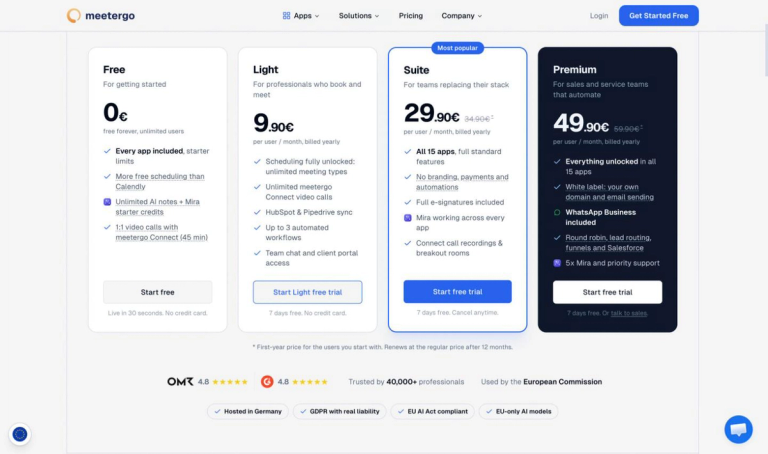
Pricing
| Plan | Price |
|---|---|
| Free | €0, up to 3 people, local recording unlimited |
| Light | €12.90 per person a month, billed yearly |
| Suite | €99 a month, 1 seat plus 2 free, recordings kept 180 days |
| Premium | €179 a month, 1 seat plus 2 free, recordings kept 1 year |
Prices from the meetergo pricing page, checked 17 November 2026, excluding VAT. There is a free plan with no time limit and a separate 7-day trial on the paid plans, without a card.
Where meetergo shines
- Local recording and local transcription with no account and no minute cap
- A stated retention window for recordings rather than an open-ended cloud archive
- Microphone and far-side audio captured as separate channels
- Recording notice placed in the invitation and the meeting chat for the cloud notetaker
- Works with phone calls and in-person conversations taken on the computer
- GDPR compliance with servers in Nuremberg and a German company behind them
- Imports existing Zoom, Teams and voice-memo files for local transcription
Where meetergo falls short
- The desktop app covers macOS and Windows; Linux is listed as coming
- Speaker detection and templates need an account on Light or above
- A playable cloud recording starts at Suite, not on the cheaper plans
- The cloud notetaker joins Zoom, Google Meet and Microsoft Teams only
- Reviewers name the breadth of the suite as a source of clutter
Customer Reviews
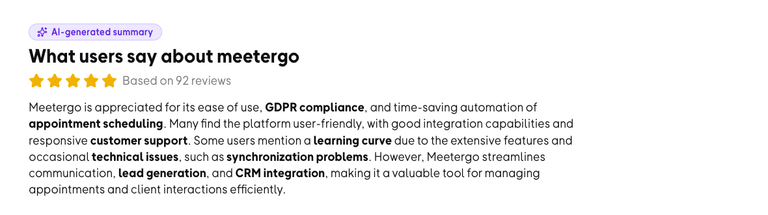
On OMR Reviews, meetergo holds 4.7 out of 5 across 189 reviews (checked 17 November 2026), with usability and support the two most-mentioned positives. The most-mentioned criticism is the interface, which reviewers tie to the size of the feature range, followed by pricing. Read the full meetergo reviews on OMR before deciding whether a suite or a single-purpose tool suits your team.
Who meetergo is for
Teams recording client conversations who need the audio to stay on their own hardware, or who want one account covering the booking, the recording, the minutes and the follow-up task. Also a fit for regulated work, where "nothing left the laptop" is the answer that ends the question.
3. Fathom: the most generous free plan
Fathom records meetings with either a bot in the call or, in beta, without one, and then produces a transcript and an AI summary. Its free plan is the reason it appears on every list in this category: unlimited recordings, unlimited transcription, unlimited call storage and unlimited downloads, with AI summary templates and the cross-call question feature limited rather than the recording itself (fathom.ai pricing page, checked 17 November 2026). The paid tiers buy team features and deeper AI rather than the right to record. What you will not get is control over where the recording lives. Calls sit in Fathom's cloud, custom data retention policies appear as an Enterprise capability, and the lookback window for a colleague's calls depends on the plan tier. For a solo consultant that is a fair trade. For a team that has to say where client audio is stored, it is the question to settle first.
Pricing
| Plan | Price |
|---|---|
| Free | $0, unlimited recordings and transcripts |
| Premium (yearly / monthly) | $16 / $20 per user a month |
| Team (yearly / monthly) | $15 / $19 per user a month, 2 users minimum |
| Business (yearly / monthly) | $25 / $34 per user a month |
| Enterprise | $35 per user a month, annual only |
From the Fathom pricing page, checked 17 November 2026.
Key features
- Unlimited recordings and transcripts on the free plan
- Choice of bot capture or bot-free capture, the latter in beta
- AI call summaries immediately after the meeting
- Clips and playlists cut from a recording
- Search across past calls
Where Fathom falls short
- No local or self-hosted option; recordings sit in Fathom's cloud
- Custom data retention is an Enterprise feature
- Team lookback depends on the plan tier
- Bot-free capture is still in beta
Customer Reviews
Fathom scores 4.8 out of 5 from 297 reviews on Trustpilot (checked 17 November 2026). Reviewers praise accurate summaries with action items and the freedom to stop taking notes; the recurring complaints are the bot occasionally failing to join a call, a desktop widget that does not always launch, and awkward exports. The Fathom reviews on Trustpilot show both patterns clearly.
Who Fathom is for
Individuals and small teams who want recordings and summaries at no cost and have no constraint on where the audio is stored.
4. Fireflies.ai: broad platform coverage, storage as the brake
Fireflies.ai sends a notetaker into Zoom, Google Meet, Microsoft Teams and ten more platforms, transcribes in over 100 languages, and connects the output to CRM and task tools. Its free plan transcribes without a meeting cap, which reads well until you reach the storage line: 400 minutes of storage for the whole team, 20 AI credits, a two-hour recording limit, limited AI summaries, and no video recording and no downloads at all (fireflies.ai pricing page, checked 17 November 2026).
Video recording, transcript downloads and recording downloads start on Pro at $10 per seat a month billed annually, which also raises storage to 8,000 minutes per seat. Unlimited storage arrives on Business at $19 per seat a month annually, and custom data retention and private storage are Enterprise lines. In practice the free plan is a transcript service rather than a recorder: 400 minutes across a team is about six and a half hours of meetings before the archive stops growing.
Pricing
| Plan | Price |
|---|---|
| Free | $0, 400 storage minutes per team, no video recording |
| Pro (yearly / monthly) | $10 / $18 per seat a month, 8,000 storage minutes per seat |
| Business (yearly / monthly) | $19 / $29 per seat a month, unlimited storage |
| Enterprise | $39 per seat a month, annual only |
From the Fireflies pricing page, checked 17 November 2026.
Key features
- Notetaker for Zoom, Google Meet, Microsoft Teams and more than ten other platforms
- Transcription in over 100 languages with auto language detection
- Chrome extension recording without the Fireflies bot
- Meeting search across the archive
- Task and CRM handoff from detected action items
Where Fireflies falls short
- No video recording and no downloads on the free plan
- 400 minutes of storage per team on Free, counted across everyone
- Two-hour recording limit on Free and Pro
- Custom data retention and private storage sit on Enterprise
- Transcripts and recordings are processed and stored outside the EU
Customer Reviews
Fireflies holds 4.5 out of 5 from 924 reviews on Trustpilot (checked 17 November 2026). The strongest praise is for accuracy and the time saved on recaps; the recurring complaints are support responsiveness, automated replies, account management and paywalls around downloading a transcript someone else shared. The Fireflies reviews on Trustpilot are worth skimming for the support pattern specifically.
Who Fireflies.ai is for
Sales and revenue teams on paid seats who want meeting data flowing into a CRM and who can work with cloud storage outside Europe.
5. Otter.ai: audio playback, with a minute counter
Otter.ai is the name most people in English-speaking markets reach for first, and it is a transcription product that happens to let you replay the audio. The free Basic plan gives 300 transcription minutes a month with a 30-minute ceiling per conversation, audio playback at single speed, and a history limited to the 25 most recent conversations. Exports are mp3 and txt only. Pro at $8.33 per user a month billed annually raises that to 1,200 in-app recording minutes with 90 minutes per meeting and unlimited storage, and Business at $19.99 removes the meeting caps (otter.ai pricing page, checked 17 November 2026).
The line to read twice is video. Video replay for Zoom and Google Meet is listed on Enterprise only, so on every plan below that the artifact is audio plus text. Minute counting also bites in a way storage limits do not: a 45-minute client call is a sixth of the monthly free allowance, and the per-conversation ceiling cuts a long workshop short rather than throttling it.
Pricing
| Plan | Price |
|---|---|
| Basic | $0, 300 transcription minutes a month, 25-conversation history |
| Pro (yearly / monthly) | $8.33 / $16.99 per user a month, 1,200 recording minutes |
| Business (yearly / monthly) | $19.99 / $30 per user a month, unlimited meetings |
| Enterprise | Custom pricing, adds video replay and custom retention |
From the Otter.ai pricing page, checked 17 November 2026.
Key features
- Live transcription during the meeting
- Audio recording playback on every plan, with speed control from Pro
- AI chat across past conversations
- Mobile recording for in-person meetings
- Imported file transcription, three files for life on Basic
Where Otter falls short
- Video replay for Zoom and Google Meet is an Enterprise feature
- 300 minutes a month and 30 minutes per conversation on the free plan
- History on Basic stops at the 25 most recent conversations
- Export on Basic is limited to mp3 and txt
- Audio and transcripts are hosted in the United States
Customer Reviews
The Otter iOS app carries 4.8 out of 5 from about 90,000 ratings (checked 17 November 2026), and the critical reviews cluster on two themes: features moving between plans, including export being gated behind an upgrade, and slow support on account problems. The developer's public reply points to the 300-minute free tier. The Otter.ai app listing carries both sides, including a reviewer who raised their score after support eventually resolved a frozen account.
Who Otter.ai is for
Individuals who mostly need searchable text, record in short sessions, and can live with audio rather than video.
6. Granola: records the meeting, keeps no audio
Granola captures device audio without putting a bot in the call and writes notes against whatever you typed during the meeting. Its design choice is the interesting one for this comparison: audio is deleted after transcription on every tier, free and paid (granola.ai pricing page, checked 17 November 2026). The free Basic plan keeps 30 days of meeting history, Business at $14 per user a month makes history unlimited, and Enterprise at $35 adds workspace-wide retention policy and org-wide auto-deletion periods.
If your reason for searching is a replayable file, this is the section that saves you a month. There is nothing to replay by design. If your reason is that you cannot write and listen at once, deleting the audio is a feature rather than a gap, and it removes the awkward question of who else can hear the client later.
Pricing
| Plan | Price |
|---|---|
| Basic | $0, 30 days of meeting history |
| Business | $14 per user a month |
| Enterprise | $35 per user a month |
From the Granola pricing page, checked 17 November 2026.
Key features
- Bot-free capture from device audio
- Notes written against your own typed fragments
- Speaker tagging and custom note templates
- AI chat within and across meetings
- Desktop, iOS, Android and watch apps
Where Granola falls short
- Audio is deleted after transcription on every plan, so there is no recording to replay
- Meeting history on the free plan stops at 30 days
- Admin-level retention policy is Enterprise only
- Integrations such as Notion, Zapier and HubSpot are not on the free tier
Customer Reviews
Granola's Trustpilot page shows 3.4 out of 5 from only 2 reviews (checked 17 November 2026), which is too small a sample to read as a verdict either way. What the two do surface is the live argument about this category: one objects to recording that participants are not clearly told about. The Granola reviews on Trustpilot are short enough to read in full, which is the honest way to treat a two-review average.
Who Granola is for
People who want notes rather than evidence, and who would rather no audio of the meeting exists anywhere afterwards.
7. OBS Studio: raw capture and nothing else
OBS Studio is free and open-source software for video recording and live streaming, available for Windows 10 and 11, macOS 13 or newer, and Linux, with the current release dated 29 October 2026 (obsproject.com, checked 17 November 2026). It captures windows, screens, webcams and audio sources into a local file at whatever quality your disk can take. No bot, no cloud, no account, no transcription, no summary, no limit of any kind on length.
It is a production tool rather than a meeting tool: you build a scene, select audio sources, set an encoder, and start recording by hand every time. There is no calendar connection, no speaker labelling and no searchable archive, so you end up with video files named by timestamp. For a recurring need that is a lot of manual steps; for the occasional workshop you must capture in full with no third party involved, nothing beats it on price.
Pricing
| Plan | Price |
|---|---|
| OBS Studio | Free and open source, no tiers |
Key features
- Local recording of screen, window, webcam and audio sources
- Scene composition with multiple sources
- No length, storage or account limits
- Windows, macOS and Linux builds
- Full control over encoder and output quality
Where OBS Studio falls short
- No transcription and no summaries
- No calendar integration or automatic start
- Manual setup of audio sources before each session
- No searchable archive of past meetings
- A learning curve aimed at streamers rather than meeting hosts
Customer Reviews
OBS Studio is a volunteer-run open-source project rather than a vendor with a review listing, so there is no rating with a sample size to quote here. The signals available instead are its release cadence and its forum, where meeting capture appears mainly as a question about audio routing rather than a complaint about reliability.
Who OBS Studio is for
Anyone who needs a high-quality local video file of a session, has no need for text, and does not mind driving the recorder by hand.
8. Recording hardware for the room
Software only records what reaches the computer. For a meeting around a table, a lawyer's office or a site visit, a dedicated device is the more reliable capture: a pocket voice recorder or an AI wearable that clips to a shirt, records to internal storage, then syncs to an app that transcribes and summarises.
Two routes exist. A plain voice recorder produces an audio file, has no subscription and no cloud, and leaves the transcription to you or to whichever app you drag the file into: this is where meetergo Log's file import or a transcription service picks up the job. An AI recorder pairs the device with a subscription instead. PLAUD, the most visible of these, sells several devices and bundles each with a plan, where the Free Starter plan carries 300 transcription minutes a month, Pro raises it to 1,200 and an Unlimited plan removes the cap (plaud.ai, checked 17 November 2026). Device prices appear only inside bundle configurations, so they are not quoted here.
Whichever route you take, in-person capture has its own problems: microphone placement, cross-talk and a room where nobody is on a screen to see a recording banner. Our guide to choosing an AI notetaker for in-person meetings goes through those in more detail.
Pricing
| Plan | Price |
|---|---|
| Plain voice recorder | One-off device purchase, no subscription |
| AI recorder, Free Starter plan | 300 transcription minutes a month |
| AI recorder, Pro plan | 1,200 transcription minutes a month |
| AI recorder, Unlimited plan | Unlimited transcription minutes |
Plan allowances from plaud.ai, checked 17 November 2026. Device prices are shown only as bundles and are not quoted.
Key features
- Capture that does not depend on a laptop being in the room
- Internal storage, so a dropped connection costs nothing
- Wearable form factors for hands-free recording
- Audio files that can be transcribed locally afterwards
- No bot and no visible software in the meeting
Where recording hardware falls short
- A second device to charge and not lose
- Transcription allowances are metered by subscription tier
- No speaker separation by channel, since everything reaches one microphone
- Nothing on a screen signals to the room that recording is on
- Audio quality depends entirely on where the device sits
Customer Reviews
Review coverage for this hardware class sits mostly in retailer listings rather than business software platforms, and the numbers there mix device models and bundles, so no rating with a reliable sample size is quoted here. The recurring theme in product documentation and support material is transcription minutes, which is the limit buyers meet first.
Who recording hardware is for
Anyone whose important conversations happen in rooms rather than on calls: field sales, site inspections and client consultations.
When the file disappears: retention side by side
This is the column most comparisons leave out, and the one that decides whether you still have the conversation when you need it. Every figure below is the default, with no admin changes applied.
| Option | Playable recording kept? | Default deletion | Who can change it |
|---|---|---|---|
| Microsoft Teams | Yes, video and transcript | 120 days, then the recycle bin | A Teams admin, for new recordings only |
| Zoom cloud recording | Yes | No time limit; capped by 10 GB per licence | Account admin, by buying storage |
| Google Meet | Yes, in Drive | Whatever your Drive rules say | A Workspace admin |
| meetergo | Yes, from Suite | 180 days on Suite, 1 year on Premium | Set by plan; local files are yours to keep |
| Fathom | Yes | No stated limit on free; custom retention on Enterprise | Enterprise administrators |
| Fireflies.ai | Video from Pro upward | 400 storage minutes per team on Free | Plan upgrade, or Enterprise retention rules |
| Otter.ai | Audio; video only on Enterprise | Last 25 conversations on Basic | Plan upgrade, or Enterprise retention |
| Granola | No | Audio deleted after transcription | Nobody; it is the design |
| OBS Studio | Yes | Never, it is your file | You |
Three patterns come out of it. Platform recorders delete on a timer you did not set. Cloud AI recorders delete by quota, which arrives sooner for a team than for one person. Local recording is the only row where the answer to "how long do we keep this" is a decision rather than a default, which is also why a local file needs a deletion policy of your own: under GDPR, keeping a recording of identifiable people indefinitely because nothing forces you to delete it is not compliance.
If free tiers are the deciding factor across your whole stack rather than just the recorder, our look at what free scheduling plans actually include applies the same reading to the booking side.
Before you hit record: who you have to tell
The legal position is not a footnote, and it differs by where the participants sit rather than where the vendor does.
In the EU and UK, a recording of identifiable people is personal data. You need a lawful basis, people have to be informed before it starts, and you need a retention period and a way to delete on request. Consent collected under pressure in a live call is weak, which is why the notice belongs in the invitation rather than in the first minute of the meeting. For employee meetings in Germany, works council involvement is likely. The detail of running AI notes lawfully is in our guide to GDPR-compliant AI meeting notes.
In the United States, federal law and many states allow one-party consent, so your own agreement is enough. Several states, California among them, require all parties to agree. A call across state lines can fall under the stricter rule, which is why sales teams recording nationally usually announce every call regardless.
Practically, three things make this painless: put the notice in the calendar invitation so nobody is surprised, say it once out loud at the start, and use a tool that shows the recording state in the call. A tool that markets itself on recording people without telling them is selling you the liability, not solving it.
Which recorder fits which case
- You already pay for Teams, Zoom or Google Workspace and record occasionally. Use the built-in recorder, and check the retention default before you rely on it. In Teams that means asking an admin about the 120-day expiry.
- You need the audio to stay on your own hardware. A local desktop recorder is the only option that qualifies. meetergo Log does it free with no account; OBS does it with no text output at all.
- You want recordings and summaries at no cost and storage location is not a constraint. Fathom's free plan is the most generous in this group.
- You want meeting data in a CRM across many platforms. Fireflies on a paid seat, with the storage line read carefully first.
- You mostly need searchable text in short sessions. Otter, keeping the 300-minute free allowance and the 30-minute per-conversation cap in mind.
- You want notes and would rather no audio existed. Granola, which deletes it by design.
- Your meetings happen in rooms. A hardware recorder, with the transcription done afterwards.
- You want the booking, the recording, the minutes and the follow-up in one account. A suite rather than a point tool, with the retention window stated in the plan.
Record your client calls on your own machine

Record your client calls on your own machine
FAQ
What is the best free meeting recorder?
It depends on which artifact you want. For unlimited cloud recordings with summaries, Fathom's free plan is the most generous in this comparison. For recording with nothing leaving your computer, meetergo Log is free with no account and no minute limit. For a raw local video file at any length, OBS Studio costs nothing at all. The free plans to read twice are the ones that cap storage rather than meetings, since 400 shared minutes disappears faster than it sounds.
Can I record a meeting without a bot joining the call?
Yes, in three ways. The platform's own recording adds no participant, since the recorder is the platform. A desktop app records the system audio on your machine, which also works for phone calls and in-person conversations. Some cloud tools now offer bot-free capture, though it is newer and sometimes still in beta. A bot is not inherently worse: it makes the recording visible to everyone, which is useful when you want them to know.
Can I record a meeting if I am not the host?
Not with the platform's own recorder, unless the host grants you recording rights: in Zoom, Google Meet and Microsoft Teams that control belongs to the host or to an account whose policy allows it. What works without host rights is recording on your own machine, because a desktop recorder captures the audio your computer plays and never asks the meeting platform for permission. That is a technical answer rather than a legal one: you still have to tell the other participants, and in several jurisdictions you need their agreement.
What is the difference between a meeting recorder and an AI note taker?
A recorder leaves you a playable file. A note taker leaves you text. Several well-known note takers delete the audio once they have transcribed it, which is a privacy decision rather than an oversight. If you need to go back to what was actually said, check for a playable recording and its retention window before comparing summary quality. Our comparison of AI note takers by where the audio goes sorts that category by the same question.
How long are Microsoft Teams recordings kept?
By default, 120 days, after which the file moves to the recycle bin in the organiser's OneDrive or the channel's SharePoint site, and the owner gets an email about the deletion (Microsoft Learn documentation, checked 17 November 2026). An admin can set any value from 1 to 99,999 days, or disable expiry via PowerShell, but only for recordings created after the change. Education A1 licences are capped at 30 days.
Do I have to tell people I am recording?
In the EU and UK, yes: participants have to be informed before recording starts, and you need a lawful basis and a retention period. In the United States it depends on the state, with some requiring every participant's agreement rather than only yours. The practical answer everywhere is to put the notice in the invitation and repeat it at the start of the call.
Can I transcribe a recording I already have?
Yes. Most tools in this comparison accept uploaded audio and video, usually with their own limits: Otter's free plan allows three imported files for life, and local tools transcribe files without a quota. Dragging an old Zoom recording, Teams export or phone voice memo into a desktop recorder is also the cheapest way to rescue the meeting nobody recorded properly.
Sources
- meetergo pricing page and AI Notes product page, checked 17 November 2026
- Zoom pricing page, checked 17 November 2026
- Google Workspace pricing page, European price list, checked 17 November 2026
- Microsoft Learn, Manage Teams recording expiration policy, checked 17 November 2026
- Fathom pricing page, checked 17 November 2026
- Fireflies.ai pricing page, checked 17 November 2026
- Otter.ai pricing page, checked 17 November 2026
- Granola pricing page, checked 17 November 2026
- obsproject.com, release 33.0.1, checked 17 November 2026
- plaud.ai product and plan pages, checked 17 November 2026
- meetergo reviews on OMR Reviews, checked 17 November 2026
- Fathom reviews on Trustpilot, checked 17 November 2026
- Fireflies reviews on Trustpilot, checked 17 November 2026
- Granola reviews on Trustpilot, checked 17 November 2026
- Otter.ai app listing and user reviews on the App Store, checked 17 November 2026