Time & Projects, WhatsApp Broadcasts and Better Connect Calls
Time & Projects is here: run projects on a task board and track time on every task. Plus WhatsApp broadcasts and 42 of your ideas.
Time & Projects: your team's task board, with time tracking built in
Straight from the roadmap.
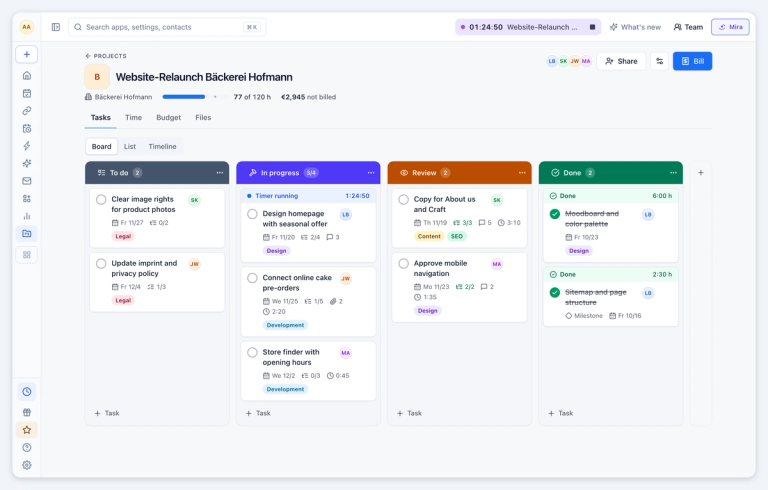
Plan every client project on a visual board. Each column is a phase, each card is a task. Drag cards from "To do" to "Done" and everyone sees where things stand at a glance.
Tasks hold everything the work needs: assignee, due date, priority, subtasks, a checklist, comments, files and screenshots. Switch the board to a list, or plan on a timeline (Premium). Columns can act on their own, for example start the timer when a task moves into "In progress". Save a board as a template for the next project.
Time runs right on the task. Your meetings and calls turn into time drafts you confirm with one click, a won deal becomes a project, and open hours become an invoice draft, in meetergo or in Lexware Office. Need working hours and vacation too? Clock in from the browser, the app or a shared tablet, and approve requests in one place.
Moving over? Import your boards from MeisterTask, Trello or Asana, and your times from Clockodo or a CSV file.
Connect calls: a clearer control bar and automatic picture in picture
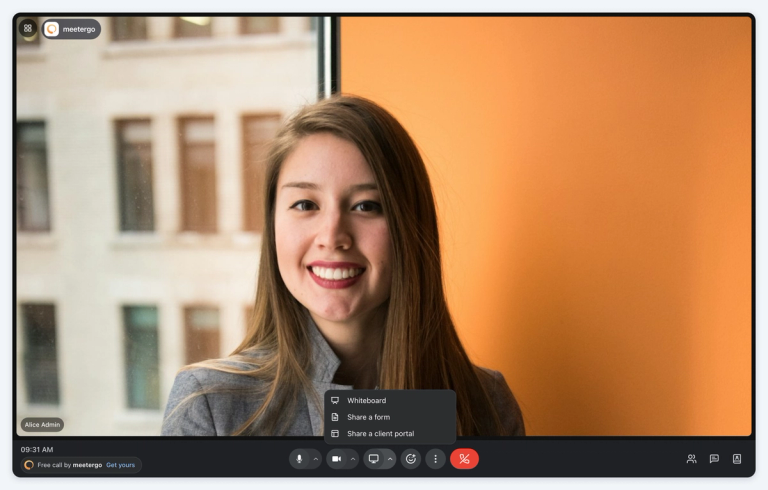
The control bar is shorter and grouped by what you do: Mic, Camera and Share each hold their related options, like speakers and background effects. When you hang up as host, you choose between leaving and ending the call for everyone. Chat shows unread messages.
Switch to another tab and the call follows you in a small picture-in-picture window, with screen shares, people without camera and the call controls. Join requests and recording consent reach you there too.
Calls also recover faster after a short network drop, and background blur no longer turns your camera white.
WhatsApp broadcasts to your CRM contacts
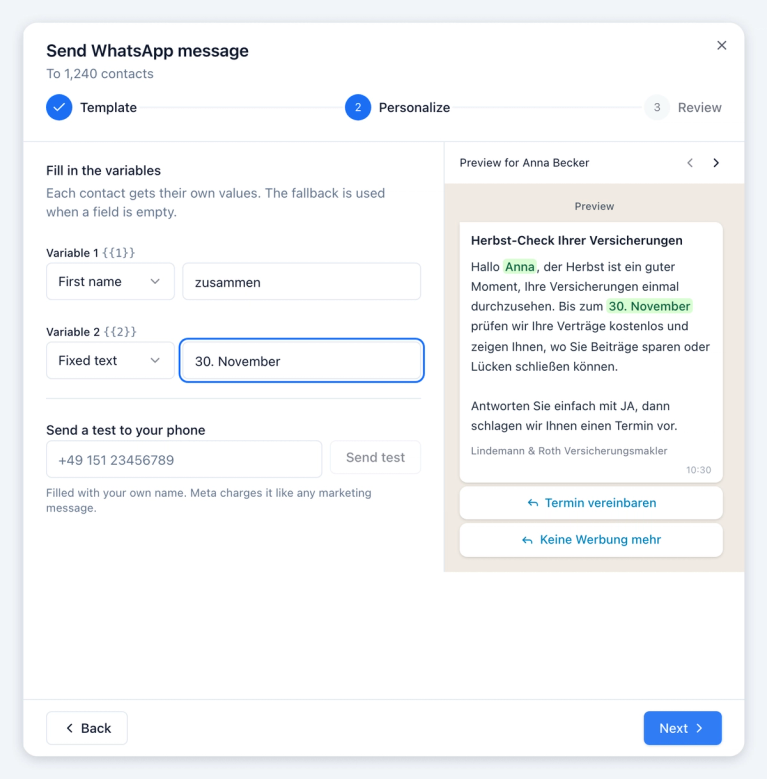
Filter your CRM contacts, for example by a tag, select them all and send one WhatsApp marketing template to everyone. Each message is personalised with the contact's fields, and you see a preview with real contacts and the cost before you send.
The report shows who got, read and replied to the message. You can pause, resume or resend to everyone who has not read it. Contacts who opted out are skipped automatically. Broadcasts live in the inbox under Campaigns.
Phone assistant improvements
The AI phone assistant now knows who is calling. It sees the caller's upcoming bookings and recent WhatsApp, SMS and email messages, so a customer who booked on WhatsApp no longer starts from zero.
Calls also run more smoothly. Callers can type their phone number on the keypad, and numbers read out in groups are noted correctly. Appointment, name and number are confirmed in a single question, "Is 4 pm free?" gets a direct answer, and a quick "mhm" or "ja" no longer cuts the assistant off.
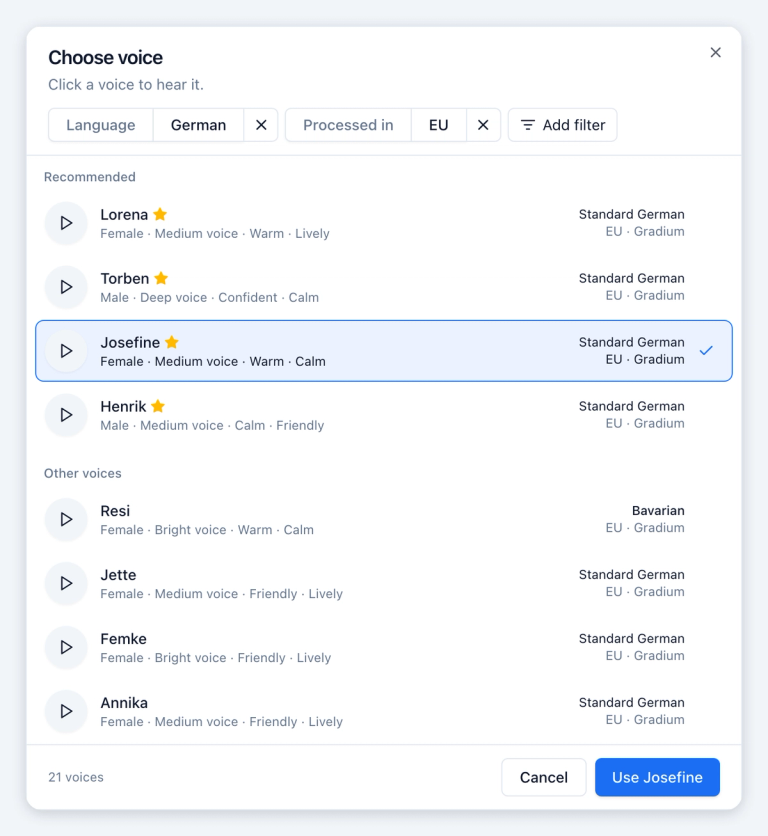
In the editor, you can now set the speaking speed. The voice picker puts tested EU voices first, filters by language, depth and region, and asks for confirmation before you pick a voice processed outside the EU.
Reviews that turn into referrals
Suggested on Saturday, live on Sunday.
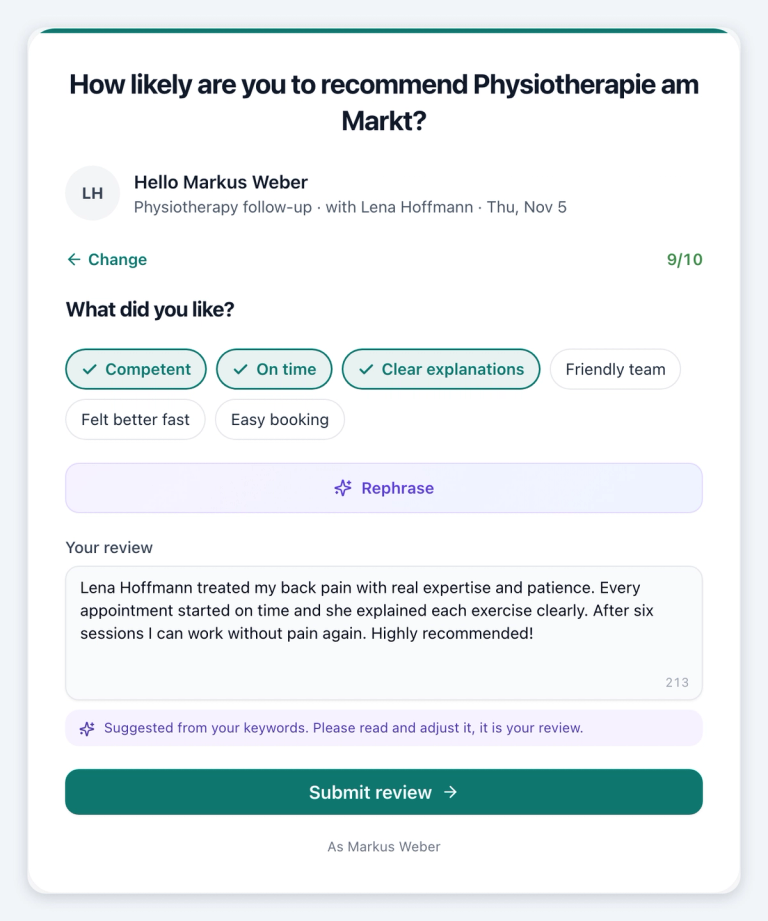
The review page is redesigned. Customers answer the 0 to 10 recommendation question, get an AI-written draft from a few keywords, and the text is copied before the review portal opens. Happy customers can refer a friend over WhatsApp in one tap.
Low scores stay private and come with a callback offer, so critical feedback reaches you first. Hosts can record a short personal video after each appointment, which then shows in the review email. Review requests can also go out on WhatsApp.
All Changes
New Features
- External speakers: Group appointments can have an external speaker with a personal link who can start the meeting.
- MailerLite: Booking contacts are added to your MailerLite groups automatically.
- Move up to an earlier time: Guests can ask to be told when an earlier slot frees up and move their booking with one click.
- Invoicing for groups: Invoice as several legal entities and branches, with cost centers, custom fields, customer references, external invoice numbers and CC/BCC copies.
- Invoicing basics: Default payment terms, CSV export, a default currency per invoice and product, hide cancelled invoices, and invoice this month's bookings before month end.
- Receipts: Receipts show open or paid, take accounting categories with yearly totals, and let you copy values from an enlarged preview.
- Offers: Customers can decline a shared offer with one click.
- E-signature: Verify signers with an SMS code, add recipients who only get the signed copy, let the sender fill fields like a client number, and detect signature fields on scanned PDFs (Suite). The API reports which checkboxes a signer ticked.
- Industry workflow templates: Ready workflows for brokers, coaches, agencies, practices, sales and recruiting, with a preview before you install.
- Follow-up forms in workflows: Workflows can send tracked forms with prefilled answers and automatic reminders.
- Mira handoffs: When Mira hands a chat to your team, she can assign it to a fixed person, create a callback task and leave a summary. Handoffs can also arrive by email.
- Inbox notifications: Get a push, a dashboard notice or an email for new messages on any channel, and choose which ones notify you.
- Events: Share and embed events, duplicate them, hide share buttons, send guests to your own page after they register, give each event its own Connect room and import guest lists from CSV.
- Recurring series: Cancel all upcoming dates of a series at once, or remove one client from their whole series in a group session.
- Coupon links: Add `?coupon=CODE` to a booking link to fill in the discount.
- OneDrive and SharePoint: Pick documents from OneDrive and SharePoint in every file picker.
- Address suggestions: On Suite and up, address fields in booking pages, CRM and Invoicing suggest addresses and fill in zip code and city.
- Create from the picker: Create a contact, company or deal right from its picker when it does not exist yet.
- CRM activity: The deal activity log shows notes, logged communications and who completed a task. Tasks show their due date and link to their contact.
- CRM views: Drag columns and saved views into your own order. CSV imports now include addresses.
- "Du" everywhere: The informal "du" setting now applies to booking pages, the reschedule, cancel and confirmation pages, and form messages.
- One email footer: Every email carries your footer with contact details, imprint and privacy links, also in its text version.
- Booking page link variable: Booking emails can link back to the booking page, so a cancelled guest can book again in one click.
- Double opt-in per booking page: Each booking page can use its own double opt-in template.
- Terms at checkout: Require buyers of session cards and payment links to accept your terms and cancellation policy.
- Forms: Email a PDF of the answers when a form is completed, use see-through colors, name your routes and filter data fields by form.
- Recordings: Edit or delete parts of a recap transcript and trim notetaker recordings.
- Meeting type dates: Add and see a meeting type's fixed dates right on its card.
- Location Finder: Book several services as one visit.
- Saved billing address: Returning bookers can reuse their saved billing address.
- Share kit: A ready email signature, website button, Google Business Profile link, WhatsApp message and QR code for your booking page.
- WhatsApp: Set ice breakers, connect a number that is still live at another provider, and subscribe webhooks to sent and delivery events.
- Webhooks: Booking webhooks list every session of a series plus guests and the host's timezone. New webhooks cover event registrations and incoming inbox messages.
- Versicherungspost: Insurance brokers can download a contract overview PDF and ask Mira about clients' contracts and due dates.
- Free plan with 3 people: Invite two teammates at no cost.
- Remove unused seats: Admins can remove seats nobody uses and get a credit for the unused time.
- Mobile: Change the appointment type when booking a follow-up.
Improvements
- Availability page: Weekly hours come first, all date exceptions live in one card, and Save appears only when you change something.
- Billing page: All plans in one comparison table, with an explanation behind every (?) and clear first-year prices.
- Calendar: Team weeks are easier to read, bookings preview on hover, and blocking time shows a summary of what will be saved.
- Booking pages: A redesigned date list, smoother loading on mobile, and long meeting type names shown in full.
- Custom domains: With your own domain connected, links to events, review pages, referrals, location finders and shared documents use it too.
- Onboarding: Faster setup, a Calendly import that takes just your name, a shorter iCloud connection and a clearer first-booking checklist on Home.
- Dark mode: Sign-in, signup and onboarding follow your device's dark mode.
- Recovery codes: Setting up your first two-factor method now includes saving recovery codes.
- Google signup: If you skipped calendar access, Home asks again with one click.
- Clockodo import: Keeps overtime pay and balances and updates changed work intervals.
- Vacation pools: Run statutory and contractual vacation as separate pools with their own carry-over rules.
- Working time export: Admins and team leads export working time as CSV, PDF and Excel.
- Project billing: Monthly retainers and hour quotas, billed once the month is complete.
- Projects: Attach files and links to tasks, and share a project with guests from other accounts.
- Google reviews: Import every night for teams with their own Place ID.
- API keys: Can now last up to one year.
Fixes
- Calendar sync: Cancelled events in ICS, CalDAV and Nextcloud calendars no longer block times, and older Google connections pick up changes right away.
- Reschedule links: Keep working after a meeting's length changes.
- Guests added later: Now get the booking's reminder emails.
- Location changes: Guests get an email when a host changes the location or adds a meeting link.
- Attachments: Reminders sent through a connected mailbox include their attachments, and confirmations using a saved template can carry files.
- Close integration: Bookings only update the matching contact and keep its name, emails and phone numbers.
- Professional Works: New clients without a birth date become leads, and existing clients are no longer overwritten.
- Single-use links: Can book every time they offer.
- Withdrawals: No longer cancel a booking automatically. You review and decide.
- Forms: Removing a field no longer deletes the form, duplicated forms keep their routes, and submission PDFs list only answered questions.
- Choice questions: Always keep at least one option, so they can no longer block bookings.
- Date fields: Accept a typed date again.
- Payments in embeds: Bookers can continue to payment when the browser blocks the redirect.
- Mollie: The return screen shows in the booking page's language.
- Signing on iPhone: Chrome on iOS signs documents with an email code again.
- Microsoft 365 inbox: Emails show their original formatting.
- Lexware: Drafts match the billing preview and go to the right customer.
- VAT ID: Shows on invoices from your billing details.
- Marketing emails: Stop right away when you opt out.
- Partners: See every company that signed up through their link, and their clients' WhatsApp conversations.
Got the next idea? Vote or suggest it on the roadmap: https://my.meetergo.com/roadmap