3x Faster, a New Look & Black Friday
Black Friday, a new look, a phone assistant you can call, and meetergo three times faster. 10 of this week's updates were your ideas.
New website, new look, Black Friday, and an assistant you can call
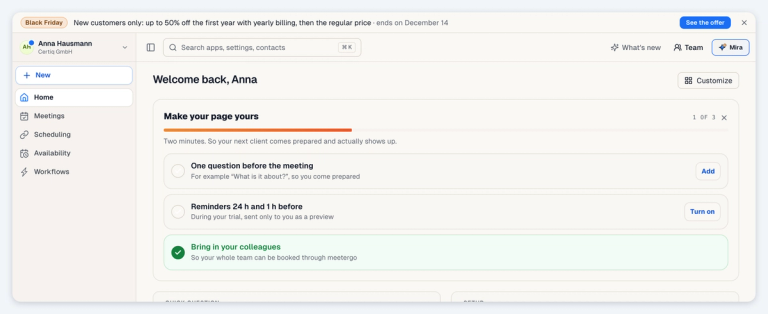
meetergo.com has a new website. The dashboard, the help center and the plan table now share its warm paper look, in light and dark, with the new Mira mark.
Black Friday runs until 14 December. New customers get up to 50% off their first year with yearly billing: 50% on Suite and Premium, 20% on Light, and 50% on the AI phone assistant. The code is filled in for you at checkout.
Want to hear what an AI phone assistant built in meetergo sounds like? Call ours at +49 1588 8639652 and ask her anything about meetergo. She answers in German.
meetergo is three times faster
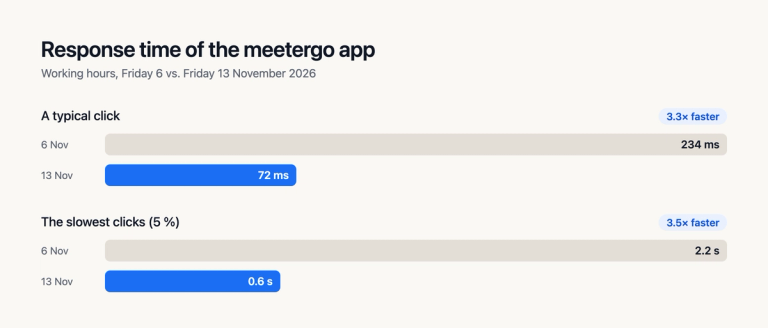
We rebuilt what happens behind every click. Measured during working hours on Friday 13 November against the Friday before, with a quarter more traffic:
- A typical click answers in 72 ms instead of 234 ms.
- The slowest clicks take 0.6 seconds instead of 2.2.
- Opening an appointment, your inbox and Mira's settings is now 6 to 10 times faster at the slow end.
Searching deals on large pipeline boards is fast again: on a board with 1,600 deals, search went from over 3 seconds to a fraction of a second. Booking a long appointment series got faster too: 25 dates are booked in about half a minute instead of up to four and a half minutes.
Connect: remind invitees who haven't joined
Waiting for someone who hasn't joined? From the invite card or the customer panel, send them a reminder with the join link by email, SMS or WhatsApp. You edit the message before it goes out. WhatsApp works while the 24-hour reply window is open.
Calls also run better: music and video sound you share reach everyone in stereo without dropouts, screen sharing stays smooth on weak connections, and your video no longer freezes when a device is too slow for the background effect.
Calendar colours by appointment type
Suggested on Wednesday, live on Thursday.
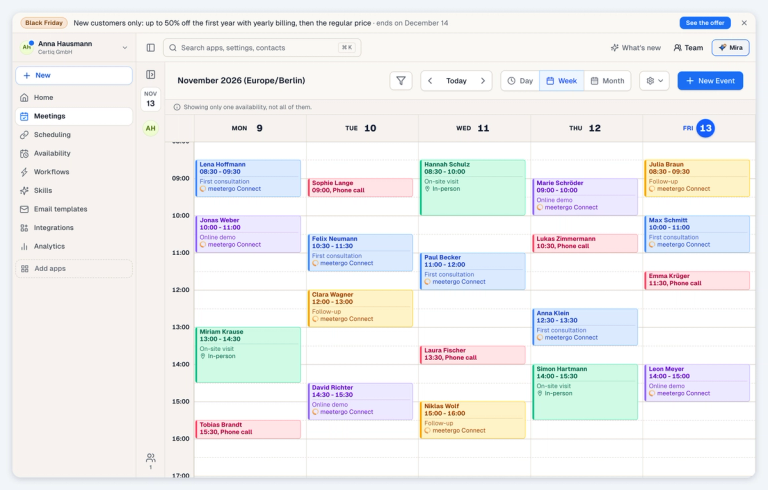
Your calendar can now colour each booking by its appointment type, so you see at a glance what your week is made of. Switch it on in the calendar settings.
All Changes
New Features
- Guests on bookings: Couples and families can both get the booking emails. Switch on "Allow attendees to add guests" on the appointment type.
- Public holidays every year: Holidays are blocked every year automatically. Admins can set them once for the whole company, including people who join later.
- AI Notes: See who each call was with, and rename a recording.
- Custom contact fields: Add your own fields to contacts under Settings, Developer, Data fields.
- Remind late invitees in Connect: Send a reminder by email, SMS or WhatsApp straight from the call.
- Calendar colours: Colour bookings by appointment type.
- Invoicing: Collect invoices by SEPA direct debit, name a contact person per document, show the buyer's trading name, and switch off the GiroCode or payment sentence per document.
- Dutch invoices: Invoices, credit notes, reminders and the online payment page are available in Dutch, with Belgian VAT wording.
- Peppol for Belgium: Belgian sellers can issue Peppol e-invoices and credit notes, ready for their Peppol provider.
- External invoice references: Credit notes, cancellations and follow-up invoices can reference invoices issued in another system.
- Klarna: Take booking payments with Klarna through Mollie. Switch it on in your Mollie account.
- Events: Hide how many people have registered from the public event page.
- Docs: Toggle headings fold the blocks under them.
- Zeit & Projekte: Your team can enter project time for later days.
- Mira on WhatsApp: Choose what happens outside your opening hours: an out-of-hours message, drafts for your team, or nothing.
- Phone data retention: AI phone assistants can delete transcripts and call logs after 3 or 7 days. Only company admins can change this.
- CRM companies: Select and delete several companies at once.
- WhatsApp numbers: Admins can remove an unused WhatsApp number slot themselves. The rest of the period is credited.
- Join an existing workspace: People you invite who already use meetergo get a "Join" prompt and see exactly what moves before they confirm.
Improvements
- AI phone assistant: Uses the whole knowledge brief in every call, including fee tables and checklists, and stays on the line when a caller says goodbye but still has a question.
- Longer phone assistant texts: Instructions and knowledge briefs up to 12,000 characters can be saved. Longer text is flagged, never cut off, and a "Show field" link takes you to whatever blocks saving.
- Forms: Team members can add and edit questions and pages in their own forms without admin rights. Forms without an ending page can send people to a website or another form.
- Reschedule emails: The email for a rescheduled booking also shows the previous time.
- Calendar privacy: Teammates always see your connected calendar events as busy time only.
- Round robin: Bookings spread evenly even while they wait for email or host confirmation.
- Team meeting types: Each host's schedules are listed when you choose common or per-channel availability.
- Google guest lists: Guest-list visibility can be set per meeting type as well as in templates.
- E-signatures: Requests accept PDFs with large plan drawings or high-resolution images. Templates refuse a PDF that cannot be sent and explain why.
- Signed documents: Finish automatically after a short outage at our timestamp provider.
- Group workflows: Meeting workflows on group appointments move the deal of the person who booked. Steps before or after the meeting move every attendee's deal.
- Workflow SMS and WhatsApp: Steps send to the contact's number when the booking has none.
- Workflow emails: Emails written in another language show in the editor with a note.
- Booking page: After tapping Cancel or Reschedule, the page keeps reminding the invitee to use the link in the email.
- Data deletion links: The guest link to delete data asks for confirmation first. Deleting data for an upcoming booking cancels it and removes it from your calendar.
- Data retention: Declined, expired and open booking requests are deleted once their time has passed.
- Partners: Partners can connect calendars and video tools in the workspaces they manage and join those workspaces' Connect calls as host.
- Mobile app: Contact search keeps focus while you type, the call note field stays above the keyboard on Android, and "Next up" moves on once a meeting ends.
- kMeet: An invalid token now explains what to fix.
- LinkedIn: No longer marked as beta.
- WhatsApp newsletter: The WhatsApp bulk send is now called WhatsApp newsletter.
Fixes
- AI phone bookings: The assistant no longer books the same appointment twice when a confirmation is repeated, or reports a successful booking as failed.
- Group bookings: Each attendee always gets their own confirmation email.
- Reassigned bookings: Always reach the new host, also when the original host had no calendar connected. In email confirmation mode, attendees no longer get calendar invitations from the host's calendar.
- Booking from the calendar: Yes/No questions from your booking form now appear.
- Duplicate bookings: Booking again after an error no longer creates a second appointment.
- Connect waiting room: Guests can join again after being let in.
- Mobile contacts: Contacts saved in the mobile app reach the CRM again.
- Contact companies: A contact you add shows only the company you pick, and a company you remove stays removed when the person books again.
- Paid booking pages: Pages saved without a currency take payments in euros, as shown in the editor.
- PDF pen: Writing with a pen no longer draws stray lines, and leaving a PDF with unsaved writing asks first.
- Excel export: Attendee emails and phone numbers are plain text again.
Got the next idea? Vote or suggest it on the roadmap: https://my.meetergo.com/roadmap