
Key takeaways
- SavvyCal has two paid plans: Basic at $10 and Premium at $17 per user/month. There is no standing free plan, just a trial and a 30-day money-back guarantee.
- Pricing is per user, so it scales with team size. Five seats on Premium is $85/month, billed against the same calendar-overlay product.
- Premium adds the parts most teams want. Custom domains, branding removal, paid bookings, and ranked availability all sit on the top tier.
- The product is narrower than the price suggests. No built-in video, no e-signatures, and no real CRM, so you will run other tools alongside it.
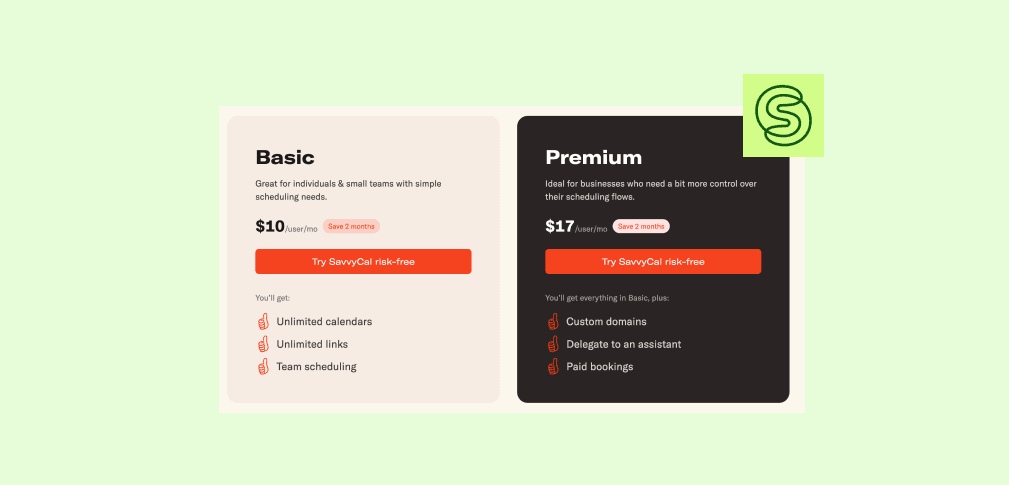
SavvyCal costs $10 per user/month on Basic and $17 per user/month on Premium, less on annual billing, with no standing free plan, just a trial and a 30-day money-back guarantee. It is one of the few schedulers people genuinely praise for its booking experience, thanks to a calendar-overlay design that lets invitees see their own calendar while picking a time. The pricing is simpler than the product, so the real question is what each tier gates and where SavvyCal expects you to bring your own tools.
How Much Does SavvyCal Cost?
| Plan | Price |
|---|---|
Free trial | 30-day money-back |
PlanFree trial Price30-day money-back | |
Basic | $10/user/mo ($8.33 annual) |
PlanBasic Price$10/user/mo ($8.33 annual) | |
Premium | $17/user/mo ($14.17 annual) |
PlanPremium Price$17/user/mo ($14.17 annual) | |

Annual billing saves about two months (roughly 17 percent off the monthly rate), so a yearly commitment is the only way to hit the lowest per-seat price. Both paid plans include unlimited links, meeting polls, round-robin and collective scheduling, and workflows; the gap between them is branding, custom domains, and payments, covered below. Neither tier has a usage cap, so the cost is purely a function of how many seats you buy.
meetergo: A More Complete Alternative
If you want SavvyCal's polish but also need the tools it leaves out, meetergo covers more of the workflow.
- Built-in encrypted video, payments, and e-signatures in one platform
- EU servers with no US corporate parent, for GDPR-sensitive teams
- A free forever plan, Light at €9.90/user/month billed yearly for one fully unlocked app, and Suite at €29.90/user/month for the first year for all 15 apps with full standard features
See how meetergo compares. Live in 30 seconds, no credit card.
SavvyCal Pricing Plans: A Breakdown
Free Trial
SavvyCal has no standing free plan. You get a free trial to test the calendar overlay and basic booking, backed by a 30-day money-back guarantee, then you pick Basic or Premium when you are ready.
Basic Plan
At $10 per user/month, Basic is the entry point. It includes unlimited scheduling links, unlimited calendar connections, meeting polls, team scheduling with round-robin and collective modes, workflows, and the integrations and API.
For an individual or a small team that mainly needs an excellent booking page, Basic covers it. The one thing it leaves out is taking payment at booking, so if you charge for sessions you will be looking at Premium from the start.
Premium Plan
Premium at $17 per user/month adds the features teams tend to assume are standard: custom domains, sending domains, branding removal, ranked availability so a host can signal preferred slots, and paid bookings through Stripe.
If you want clients booking on your own domain or paying when they book, you are on Premium. Ranked availability is the quiet standout: you can steer bookers toward the slots you prefer without hiding the rest, which helps cluster meetings rather than scatter them across the week.
SavvyCal's Extra Costs to Watch
The thing to internalize before comparing seat prices: with SavvyCal you are paying for the booking experience, not the rest of the stack. Two of its real costs are tools it expects you to bring.
- Per-user scaling. Both tiers are priced per seat, so a 5-person team on Premium is $85/month before any other tool.
- Payments are Premium-only. Taking money at booking requires the top tier, where Acuity and meetergo allow it lower down.
- No built-in video. Calls route to Zoom or Google Meet, which is a separate subscription and setup.
- No e-signatures or CRM. If your sales motion needs contracts signed or deals tracked, those live in other tools you pay for on top.
SavvyCal Pros & Cons
Pros
- A booking experience users genuinely like, led by the calendar overlay
- Strong team scheduling with round-robin and collective modes on Basic
- Stripe Tax support to calculate and collect EU VAT and GST automatically
- Clustered meetings and frequency limits to protect focus time
Cons
- Per-user pricing adds up for larger teams
- No built-in video, e-signatures, or native CRM with a deal pipeline
- US-hosted, with no EU data-residency option for GDPR-sensitive buyers
Compare an all-in-one option. No credit card required.
Who Is SavvyCal Best For?
SavvyCal fits design-conscious sales, consulting, and customer success teams that want the cleanest possible booking flow and are happy to run video, contracts, and CRM elsewhere. The calendar overlay genuinely cuts scheduling back-and-forth, which is worth real money to people who book dozens of external meetings a week.
It is a weaker fit for teams that want one tool to handle booking through payment and signature, or that need data to stay in the EU. For those buyers the per-seat price buys a narrower product than the number suggests.
SavvyCal Customer Reviews
Positives

Reviewers like the booking experience most. One G2 reviewer gave SavvyCal 5 out of 5 for its flexible availability controls, and another scored it 4 out of 5 for how easily it syncs with Google Calendar.

Complaints

The recurring critiques are price and platform. A mid-market reviewer who rated SavvyCal 3 out of 5 on SoftwareFinder credited the scheduling features but flagged the high price, occasional delays accessing the service, and the lack of a portable app. That tracks with the wider pattern across SavvyCal's G2 reviews: a steep per-seat cost and a mostly web-based experience with no dedicated mobile app.
It also carries reviews on its Capterra profile and SoftwareAdvice profile.
Alternative to SavvyCal: meetergo
SavvyCal and meetergo both care about the booking experience, and SavvyCal's calendar overlay is a genuinely nice piece of UX that meetergo does not copy. The difference is scope.
meetergo includes encrypted video on the call itself, takes payments and deposits plus e-signatures in the same flow, and runs a sales CRM with the Mira AI assistant, all on EU servers under EU law. For a team that wants the whole motion in one place, that breadth matters more than overlay polish.
| Plan | meetergo | SavvyCal |
|---|---|---|
Free | €0 forever, unlimited users | $0 (1 link) |
PlanFree meetergo€0 forever, unlimited users SavvyCal$0 (1 link) | ||
Entry paid | Light €9.90/user/mo (yearly) | Basic $10/user/mo |
PlanEntry paid meetergoLight €9.90/user/mo (yearly) SavvyCalBasic $10/user/mo | ||
Top tier | Premium €49.90/user/mo first year; €59.90 regular (yearly) | Premium $17/user/mo |
PlanTop tier meetergoPremium €49.90/user/mo first year; €59.90 regular (yearly) SavvyCalPremium $17/user/mo | ||
Full plan detail is on the meetergo pricing page.
Is SavvyCal Worth the Price?
If a beautiful, low-friction booking page is the thing you care most about and you already have video, payments, and CRM handled, SavvyCal is worth $10 to $17 per user/month. The calendar overlay and Stripe Tax handling are genuine reasons to pay for it rather than default to a free scheduler.
If you would rather pay once for booking, video, payments, signing, and a pipeline, or you need EU data residency, a broader platform gives you more for the money. Price out the tools SavvyCal expects you to bring before deciding it is the cheaper option.
Everything Calendly does, plus video, CRM, and GDPR.

Everything Calendly does, plus video, CRM, and GDPR.
FAQs
How much does SavvyCal cost?
SavvyCal is $10 per user/month on Basic and $17 per user/month on Premium, less on annual billing (about two months free). There is no standing free plan, but a 30-day money-back guarantee applies.
Does SavvyCal have a free plan?
No. SavvyCal offers a free trial and a 30-day money-back guarantee, but no standing free plan. The entry point is Basic at $10 per user/month.
What is the difference between SavvyCal Basic and Premium?
Premium adds custom domains, branding removal, ranked availability, and paid bookings through Stripe. Basic covers unlimited links and team scheduling.
Does SavvyCal charge per user?
Yes. Both Basic and Premium are priced per seat, so cost scales with the number of team members.
Can SavvyCal take payments?
Yes, through Stripe, but only on the Premium plan. It also supports automatic EU VAT and GST collection via Stripe Tax.
How does SavvyCal compare to Calendly?
SavvyCal wins on booking-page experience with its calendar overlay; Calendly wins on integration breadth and brand familiarity. Our SavvyCal vs Calendly breakdown covers the trade-offs.
Is there a SavvyCal alternative with built-in video and CRM?
Yes. meetergo includes encrypted video, payments, e-signatures, and a CRM on EU servers. Those full standard features are included in Suite (€29.90/user per month), while Free is €0 forever with unlimited users and all 15 apps at starter limits.