One Email Design, Course Events & Redesigned Booking Pages
One email design for every email, events that run as courses, and booking pages that show free times first. 26 of these updates were your ideas.
One email design for every email
You asked for this. 12 votes on the roadmap.
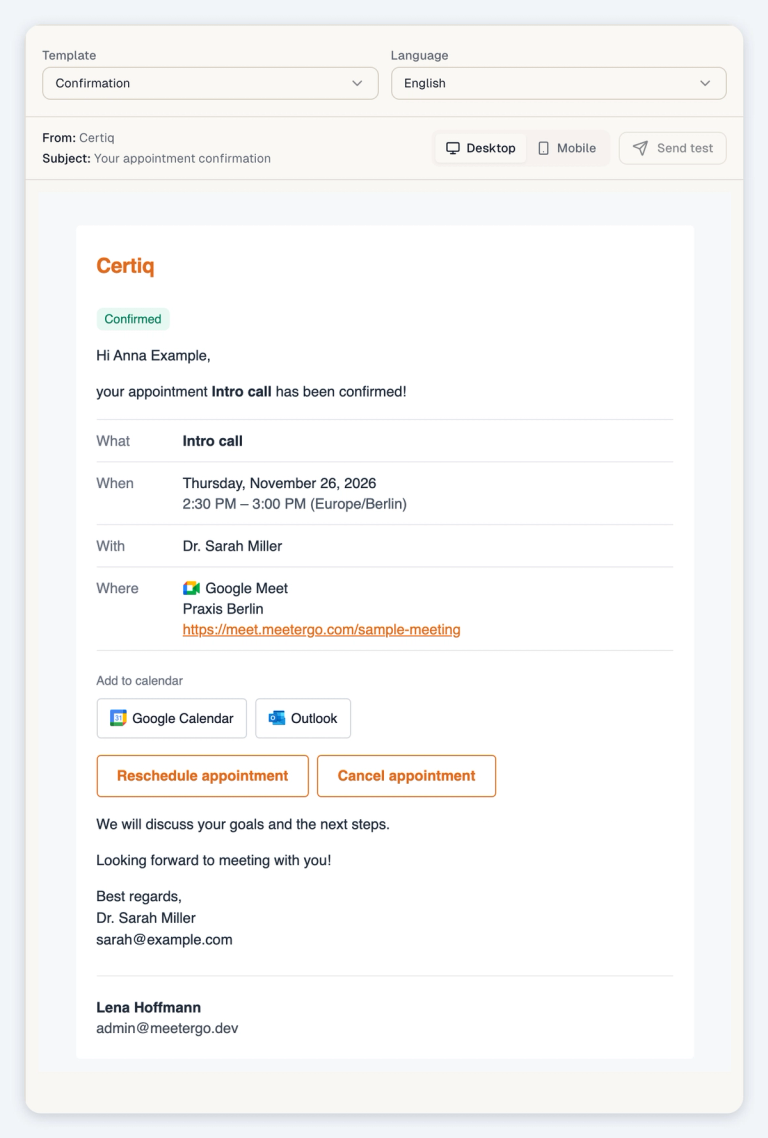
Your logo, signature, contact details, imprint and privacy link now live in one place: your email design. Every email uses them, from booking confirmations and reminders to newsletters, sequences, double opt-in and review requests. Change it once and every email follows.
Booking emails get a new look too. Each one shows a clear status, an overview of the appointment with the video app's logo, and buttons to join or add it to the calendar. Emails can end with the host's signature and your social links, your choice of formal or informal address now also applies to the fixed texts, and the footer appears in all 14 languages of your recipients.
Turning on the new design updates all standard confirmations automatically. If you wrote your own confirmation, cancellation or reschedule texts, meetergo shows which ones still need switching, and each takes one click. Your text stays, only the parts the design already shows are replaced.
Events as courses and date series
You asked for this. 13 votes on the roadmap.
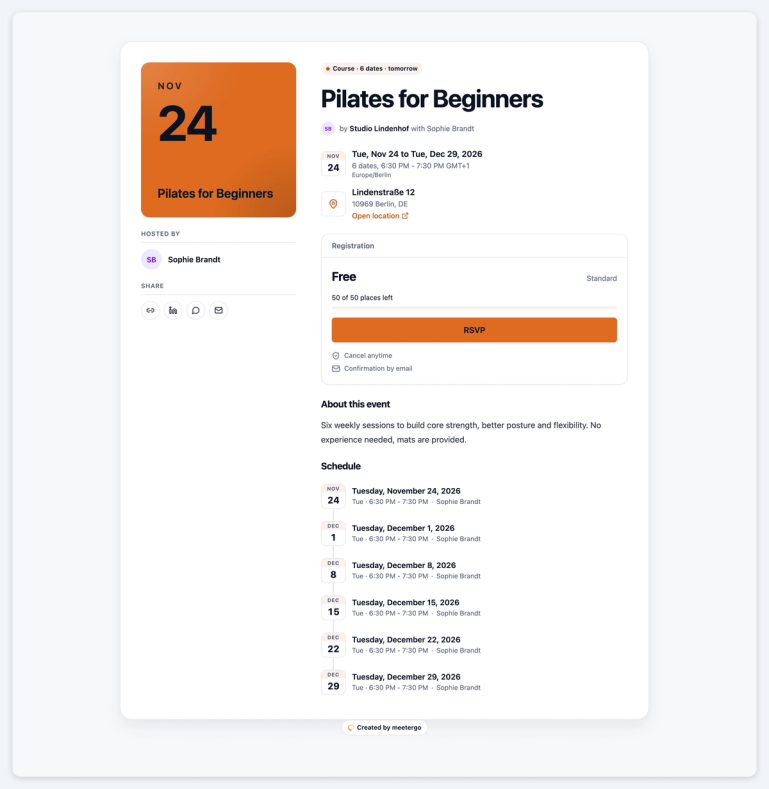
Events can now run as a course or a series of dates. For a course, guests sign up once and get every date in their calendar in one go. For a series, they pick the single date that suits them, and the page shows how many places are left on each date.
Creating an event now takes one short form, and the editor saves your changes automatically. Event pages have a cleaner layout with a single registration card, a smaller cover on phones and an add-to-calendar ticket after signing up. If you hide the registration count, the page no longer shows the total seats either, only a hint when few are left.
Booking pages, redesigned
Suggested on a Wednesday, live the next Wednesday.
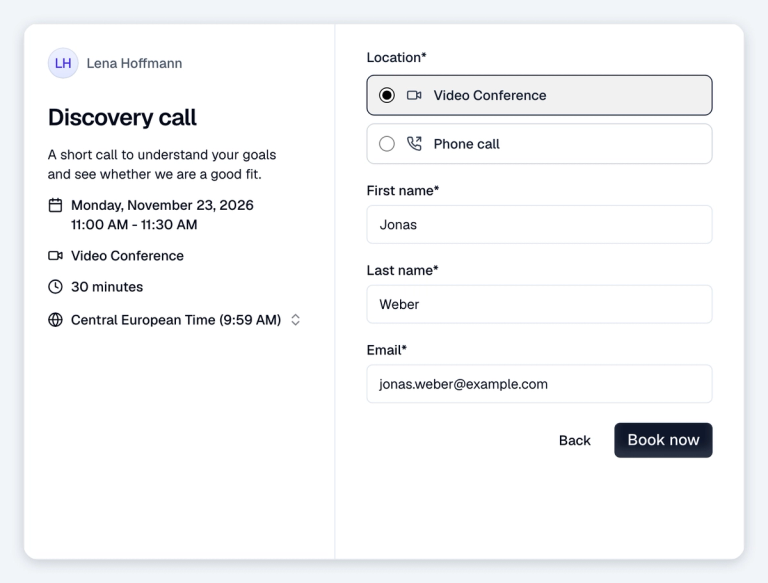
Booking pages have a fresh design. Invitees see your free times first and choose the location afterwards, so the decision about video or phone comes once the time is settled. The confirmation, reschedule and cancel pages match the new look.
Inputs, checkboxes, choices and yes/no buttons now share one consistent style across forms and booking pages, and embedded booking pages no longer make websites scroll sideways on small phones.
Build Mira assistants in a few steps
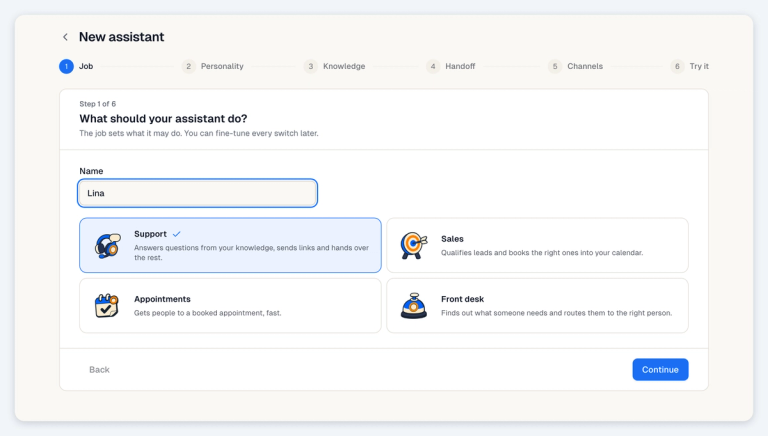
New Mira assistants are set up in a short step-by-step wizard: job, tone, channels and a first test. Afterwards you build and test each assistant in one place, choose per channel when it answers, and teach it straight from any inbox conversation.
You can test the phone assistant by voice right next to its settings, or keep chatting to check its answers. Mira now answers questions about your opening hours from the schedule you picked for it, and sends forms and booking pages on your own custom domain.
A lot faster, a lot cleaner
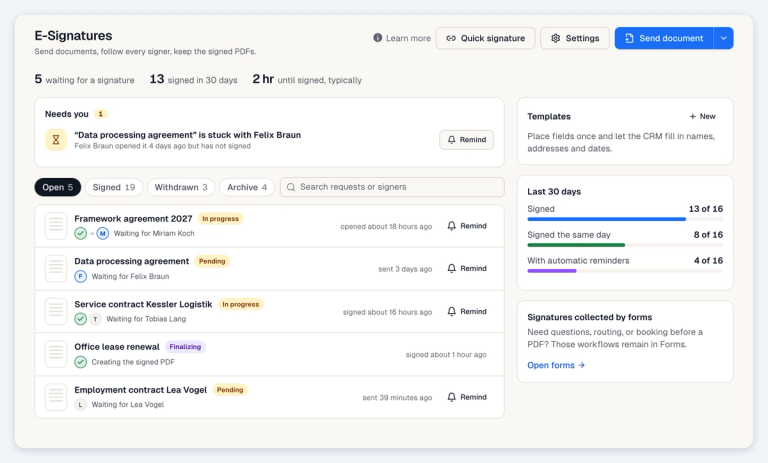
Over the past weeks we reworked large parts of meetergo, visually and under the hood. The new navigation is now the default for everyone, and the onboarding, e-signatures, reviews, notetaker list, invoice list, event pages and portals all have a new design, with the calendar and CRM now working properly on phones and tablets. At the same time, booking pages need a third of the database work to calculate your free times, the calendar opens a new booking instantly even with many availability exceptions, and the short pauses that could slow the dashboard down every few minutes are gone.
All Changes
New Features
- Request a preferred time: Invitees who find no fitting time can ask for one, and you answer with a proposal they confirm in one click. Sent proposals appear in the meeting type's Suggest time slots tab.
- Audio only and transcript only recordings: Choose Video, Audio only or Transcript only for the notetaker and meetergo Connect, and play, download or trim audio recordings on the recap page.
- Notetaker for Zoom: The notetaker can now join your Zoom meetings. Reconnect Zoom once to give it permission.
- meetergo Log: Record in-person and offline conversations with the desktop app for Mac and Windows. The transcript and summary land in meetergo.
- Minimum attendees: Group bookings can require a minimum number of attendees. Dates that do not reach it by your deadline are cancelled automatically or left for you to decide.
- Up to three reminder emails: A meeting type can send up to three reminders, for example 5 days and 1 hour before, without a workflow.
- Internal questions: Add questions to a meeting type that only your team answers on each booking. Customers never see them.
- Automatic time recording: Appointments booked through meetergo can be recorded as time once they end, with an undo on each entry.
- App access per person and team: Admins can give single people or teams their own access to each app, for example Invoicing or Events without admin rights.
- Quick signature: Drop a PDF, place the signature field and share the link. The signer enters their own name.
- E-Signatures page: See what is stuck at a glance, remind signers in one click and follow every signature in a timeline. Signed documents can also be emailed to the sender.
- Portals rebuilt: Portals work like an app on the phone, the editor shows the portal as your client sees it, and a new portal is ready in one screen. Uploaded files can be previewed, renamed and deleted.
- Session cards: Cover several appointments at once, assign cards to contacts without a purchase, and let buyers choose private or company billing.
- Reviews and referrals: Start from an industry template, collect short video reviews, ask for referrals with a personal video and an offer, and turn happy customers into case studies.
- Accounting import: Bring your EUR history over from Lexware Office or sevDesk, with original files and payment balances, in a guided import.
- Down payments and offer options: Create several down-payment invoices that are deducted from the final invoice automatically, and add optional or alternative items to offers.
- Supplier payments: Pay supplier invoices with SEPA transfer files or GiroCode.
- Invoicing extras: Statutory late-payment interest based on Bundesbank rates, year archives with SHA-256 checksums, and supporting documents such as a proof of service on invoices, credit notes and cancellations.
- CRM bulk tags: Select several contacts to add or remove tags at once.
- Several phone numbers per contact: Mark each as mobile, work, home or other. The starred number is used for SMS, WhatsApp and workflows.
- File preview in the CRM: PDFs and images open in a preview. The PDF editor shows page thumbnails and keeps unsaved annotations.
- Upcoming appointment filter: Filter contacts by whether they have an upcoming appointment, with two new built-in views.
- Log activity for colleagues: Log a call or email for a colleague and change who an entry belongs to.
- Deal imports and actions: Import deals from CSV with custom fields and stages, update existing deals, and run deal workflows from a new Run action menu.
- Save inbox attachments to the contact: Email and WhatsApp files can be saved to the contact file by file.
- Rescheduling links: Copy a rescheduling link directly from your bookings to send to attendees.
- Workflow email templates: Pick one of your saved email templates for a workflow message, switch it later or turn it back into your own text.
- SEK payments: Paid bookings can now be charged in Swedish kronor.
- Transcripts over MCP: AI agents can read a meeting's transcript and summary, and a new webhook fires when a transcript is ready.
- Developer settings: Connect Claude, ChatGPT, Gemini, Cursor or Zapier in two steps, with your tokens listed right below.
- Partner payouts: Partners set up their payout in the partner portal and receive their commission automatically each month.
Improvements
- New navigation for everyone: You can switch back to the old one under Settings › Profile.
- Phone assistant: Checks who may book from the questions you set, looks up your knowledge base for every question, reads prices, times and dates naturally, and hangs up once the caller says goodbye.
- Mira on WhatsApp: When asked to move or cancel an appointment, Mira sends the link for that appointment instead of booking a new one.
- Calendar: An Availability switch in the filter, the person's hours when creating an appointment, recorded time inside each booking, and members who may see the whole organisation can pick any team.
- Calendar sync: When a booking could not be written to the host's calendar yet, meetergo retries and the booking shows it.
- Waitlist: Records which location an invitee wants, and you can get notified when someone joins.
- Forms: Move questions between pages, block email addresses and domains, require a booking before continuing, and hide prefilled name and email with `hide_prefilled=true`.
- Conversion widget: New design with free times, shown in your website's language.
- Projects: List every deal of their customer, and add a new deal right from the project.
- CRM search: Lists, the deal board and quick search all match every word across names, email, phone and company.
- Deals table: Sort by stage, in the order of your pipeline.
- Contact filters: Pick from the tags you already use instead of typing them.
- Invoicing: Overdue invoices are marked as overdue, the list works on phones, and meeting types set to invoice automatically warn you when your tax number, VAT ID or address is missing.
- Connect: Softer edges on virtual backgrounds, and calls always use the camera and microphone you pick.
- Portuguese public holidays: Can now be blocked in your availability.
- Sign-in security: Very common passwords can no longer be chosen, and sign-in pauses briefly after 10 failed attempts.
- Email delivery status: Admins see a banner when mail to their contacts is paused, with the reason and when to try again.
Fixes
- Out of office: No longer removes the other hosts from round-robin meeting types, and teams whose members are all team admins can reassign appointments.
- Blocked times on all schedules: Editing one now shows "All schedules" and moves the block on every schedule.
- Group sessions: A calendar event no longer shows one attendee's details to everyone else after a reschedule or duration change.
- Recording notices: No longer sent for in-person or phone appointments.
- Own-domain email sender: Activating and removing it works again after its connection expired.
- Signup logos: Logos picked up from your website now show correctly in every email client.
- Samsung dark mode: Form PDFs signed on Samsung phones in dark mode now show the ticked boxes.
- iPhone business cards: Saving a contact works on iPhones and carries the photo, address and links.
- Screen sharing: Sharing your entire screen in Connect no longer makes the picture flicker.
- Client portals and signing pages: Chrome no longer machine-translates them when they are already in the visitor's language.
- E-signature webhooks: Completion webhooks are sent as JSON again with the signer, document name and status.
- Clockodo imports: Long periods no longer time out, and refusals are explained.
- CRM on phones: Deals, contacts and tasks below the toolbar are reachable again.
Got the next idea? Vote or suggest it on the roadmap: https://my.meetergo.com/roadmap