meetergo Sign Is Here, Newsletters Priced by Email & App-Like Client Portals
meetergo Sign is here: e-signatures as their own plan. Plus newsletters priced by email and portals that work like an app. 19 updates were your ideas.
meetergo Sign is here: e-signatures as their own plan
You asked for this. 14 votes on the roadmap.
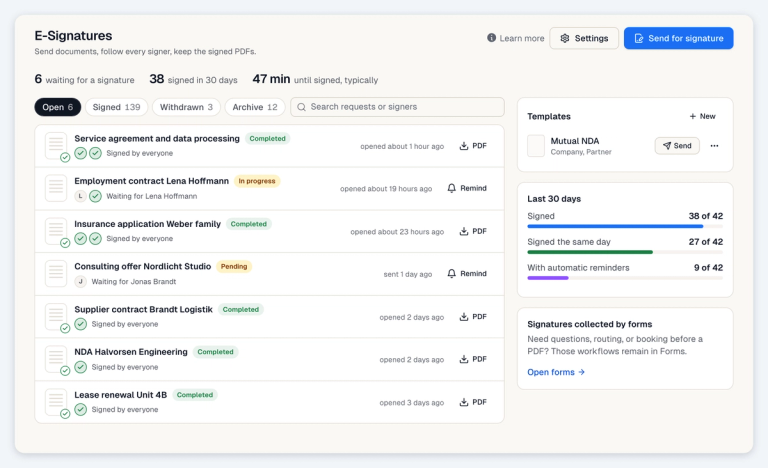
E-signatures in meetergo now have a plan of their own. meetergo Sign gives you 1,000, 5,000 or 20,000 advanced signatures (FES) a month, from €29 a month billed yearly or €35 monthly. Simple signatures are unlimited. If you go over your allowance, each extra FES costs €0.03 and nothing stops sending. Pick your tier under E-Signatures.
Sign launches with our biggest e-signature update yet:
- One session, separate documents: sign several contracts with a client at once and get each back as its own signed PDF with its own audit page.
- Verified by email or SMS: signers confirm with a one-time code by email or text message, and the audit page names the advanced signature.
- Your client's language: choose the language of the emails and the signing page for every request.
- Straight from Salesforce: send a template from a record with its fields filled in, and get the status and signed PDF back on the record.
From Suite, you can also build the contract itself. Write it once from text blocks and let clauses, fields and prices appear by condition. Each party fills in their part, your team in the dashboard and outsiders by link, and everyone signs the same final PDF. Start from a template or import an existing Word or PDF contract with Mira.
Newsletters priced by email, sent from your own domain
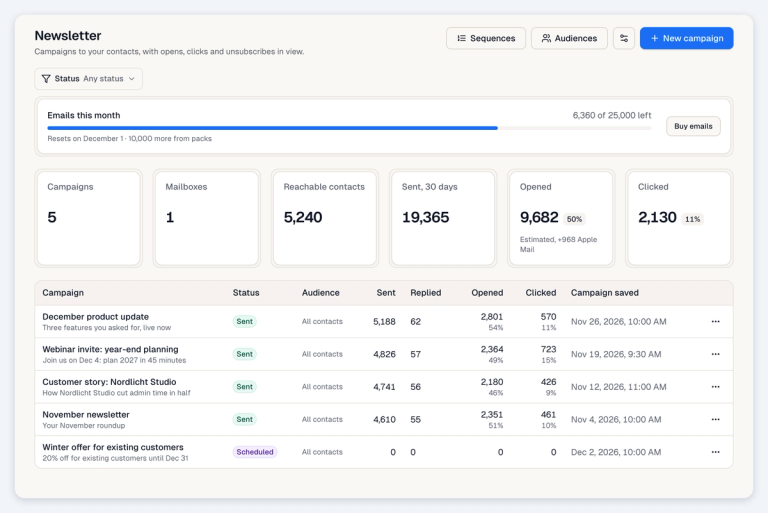
Newsletter now counts the emails you send, not the contacts you have. Contacts are unlimited on every plan. Free and Light include 1,000 emails a month, Suite 15,000 plus 2,000 per user, Premium 40,000 plus 5,000 per user.
Need more? From Suite, buy packs of 10,000, 50,000 or 250,000 emails, starting at €15. Packs stay valid for 12 months, and auto top-up buys the next one when fewer than 1,000 emails are left.
meetergo now sends your newsletters itself, from a subdomain such as news.yourcompany.com. Add the DNS records shown and meetergo verifies the domain on its own, no mailbox login needed. Your own Google, Microsoft 365 or SMTP mailbox stays available, now also shared Microsoft 365 mailboxes with send permission only.
Client portals, rebuilt for the phone
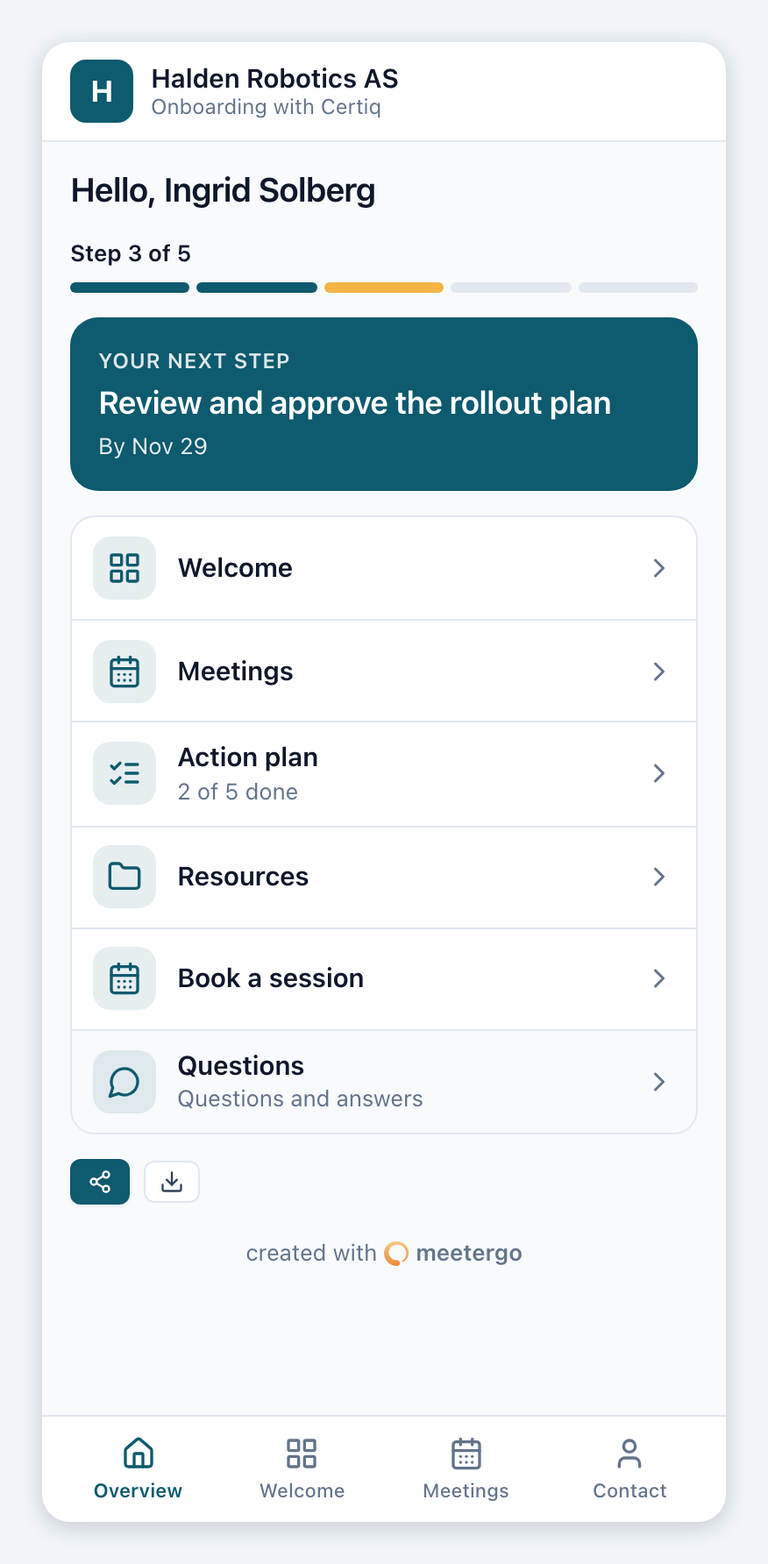
Clients now open a portal that works like an app on their phone: their next step on the overview, a plan timeline that shows who is on each step, files in a full-screen viewer, and booking without leaving the page.
The editor is now the client's view, at desktop or phone width. Type text where it stands, add content with the plus between items, and set what each plan step's button does: tick it off, open a booking, an upload or a form. Headings, buttons, separators and images lay pages out like a form.
On the go, open a portal on your phone to see new questions and files, what the client still has to do and who looked at what, and remind them of open steps in one tap. Portals created by a booking can now start from one of your saved portal templates, with the booked host as the client's contact person.
Reviews that turn into referrals and case studies
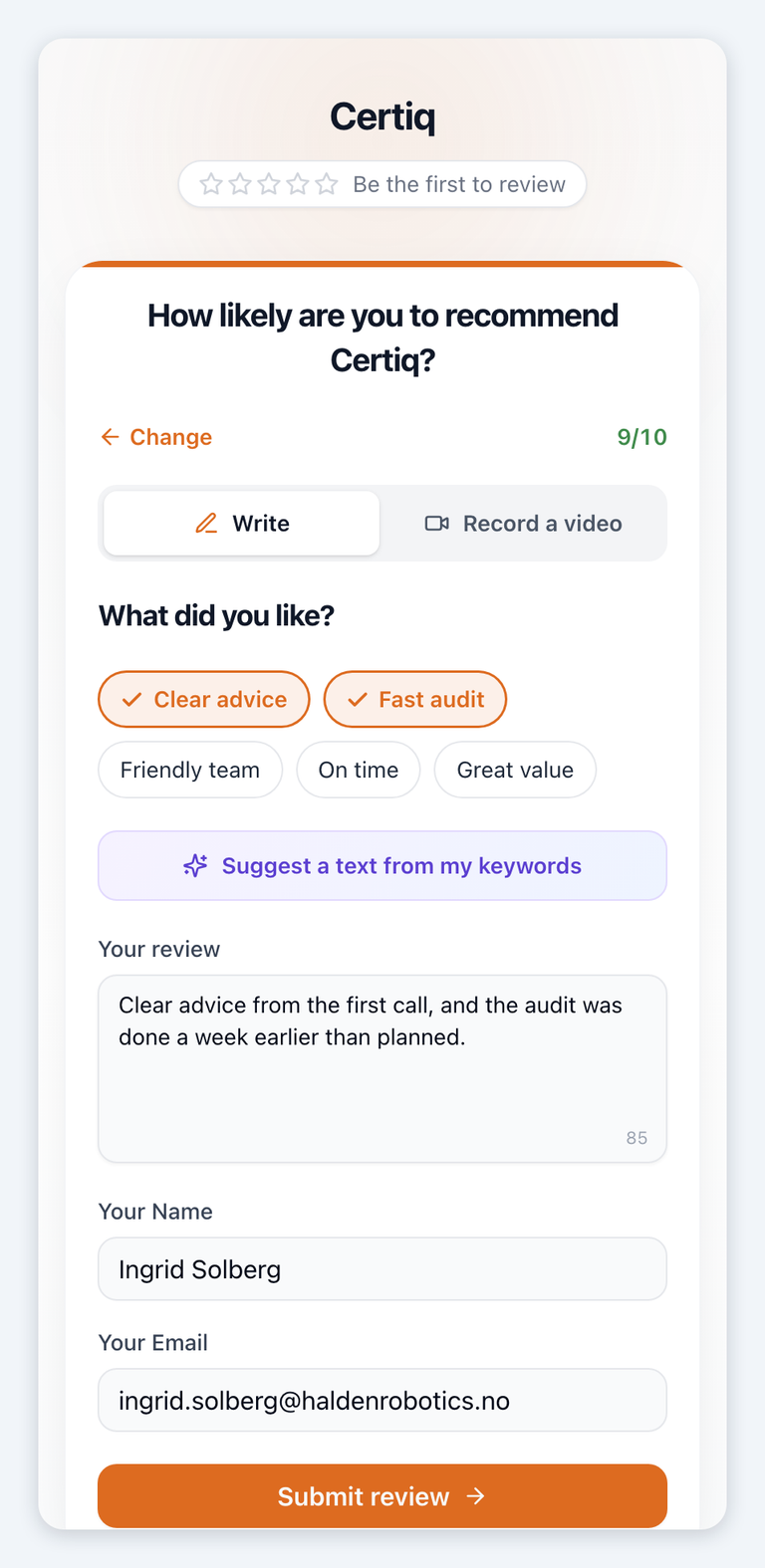
The review page asks the 0 to 10 recommendation question, offers keyword chips and an AI-written draft, and keeps critical answers private with a callback offer. Happy customers can record a short video review with your questions on screen, and you approve each one before it goes live.
Set it all up from an industry template in four answers. Review requests can wait for your personal video, and customers who rated you well get a referral ask with their own video and an offer for the friend they refer.
Under Reviews > Case studies, ask a happy customer for a short interview, then write the story yourself or let AI draft it from the review, video, AI notes and CRM, with missing facts marked instead of invented. Nothing goes public until the customer approves it under the name they choose, and they can withdraw consent at any time.
All Changes
New Features
- Import from Cal.com: Bring over meeting types from a Cal.com profile, team or organisation link, including buffers. After any import, onboarding lists every new link ready to copy, and failed imports say what went wrong.
- Sign in with Apple: Sign in or sign up with your Apple account.
- Round robin by daily workload: Each booking can go to the host with the fewest appointments that day, weighted by working time.
- Fewer time slots per day: Meeting types can show guests only a few times per day, spread across the day.
- Longer shown duration: Show guests a longer duration than the time blocked in your calendar, for example to cover follow-up time.
- Language switcher: Add `?languageSwitcher=true` to a booking link to let guests switch the page language.
- Connect recordings without AI: Record calls as video or audio only without turning on AI, and choose video, audio or transcript for each call.
- Event guest answers: Organizers can read each guest's registration form answers in the guest list.
- Event deadlines in days: Set a cancellation deadline in days, and guests see "7 days" instead of "168 hours".
- Events in more calendars: Events also appear in iCloud, CalDAV, Nextcloud and Exchange calendars and block the host's bookings, also when you connect the calendar after publishing.
- Transparent forms: Make input backgrounds, borders, the question panel and buttons partly transparent so a background image shows through.
- Numbered questions: Questions in the form editor are numbered and can move straight to any position.
- Lean form routes: Routes to a booking page or website can pass only name, email and phone.
- Deal units and roles: Count deal values in your own unit instead of a currency, and edit contact roles in the pipeline settings.
- Project services: Projects list the services your team books time on, each with its own project price. Day-priced services are billed per day.
- aB-Agenta: Send deal notes, emails and WhatsApp messages to aB-Agenta and import its tasks into the CRM.
- Task reminder emails: Turn off the email for single task reminders and keep only the daily summary.
- Pick who stays active on Free: When a paid plan or trial ends with more than 3 people, an admin chooses which 3 stay active. The others are paused, not deleted.
- Try Suite at the limit: Light customers can start the free 14-day Suite trial right where they hit a Suite limit.
- AI labels: Meeting summaries, call summaries, Mira's replies, recaps and suggested review texts are marked as created with AI.
- Event webhooks over MCP: AI agents can subscribe to event registration webhooks.
Improvements
- Teams meetings in Outlook: Microsoft Teams bookings show as a Teams meeting with the Join button in every Outlook calendar.
- Back-to-back per booking page: Back-to-back meetings can line up next to one booking page's bookings only.
- Live availability: Booking pages reflect a host's out-of-office and handed-off bookings as soon as they change.
- Rescheduling: Hosts see every free time in the dashboard when rescheduling or proposing times.
- Booking requests: Requests always include the invitee's email, can be searched while a filter is on, and declined or expired ones show in the contact's activity.
- Calendar: The booking drawer says what is still missing, and blocked times show which schedules they apply to.
- Salesforce: Bookings from a company link create the contact under that company.
- Signing page: Number fields accept thousands separators, and errors point to the field that needs fixing.
- Inbox links: Links pasted into an email arrive clickable, also with a signature.
- WhatsApp: Numbers that stop receiving messages reconnect automatically, and the send log shows messages skipped for a missing phone number.
- Pipeline values: Home and Analytics show deal values in your own unit.
- PDF layout: Offers and invoices no longer split short paragraphs across pages.
- Receipts: Dates on table-style invoices are picked up, and due dates or VAT IDs are no longer read as amounts.
- Library: Admins find files and recordings under Settings > Library.
- Selection pages: Now included from Light.
Fixes
- Exchange titles: Events and buffers with characters like & reach Exchange calendars again.
- Reminder attachments: Reminders with attachments arrive for bookings made more than a week ahead.
- iCloud and CalDAV: Moving or cancelling works when the calendar event was already deleted.
- Single-use links: Editing no longer clears the pinned location or host, and admins can edit links on a colleague's page.
- Hidden answers: Submission PDFs and emails no longer list answers that conditional logic hid.
- Form copies: Documents to sign in a copied form are filled from the copy's answers.
- Form signatures on Light: Forms on Light, Essentials and Basic can collect signatures again.
- Hide branding: The switch in the email design saves on its own again.
- Connect transcripts: No longer leave out a speaker whose audio ended with the call.
- Settings: No longer open as a half-blank window on a specific section.
- Session cards: Can be edited again after a covered booking page was deleted.
- Planned messages: Workflows with many bookings show their planned messages without delay.
Got the next idea? Vote or suggest it on the roadmap: https://my.meetergo.com/roadmap