Calendar Connections Revamped, Teams Integration Improved, Group Bookings Simplified, Co-host Management Enhanced, System Notifications Upgraded
Friday the 13th might be considered unlucky by some, but today brings nothing but good fortune for meetergo users! We're rolling out a comprehensive update that tackles some of the most requested improvements to how your meetings connect with your calendar and work with your favorite tools. Think of it as spring cleaning for your scheduling workflow – except it's summer, and we're doing all the heavy lifting for you.
These changes primarily focus on Google Calendar, Outlook, and Exchange connections, though users with other calendar providers will also notice some improvements. The updates vary depending on your setup – whether you're using calendar invite mode or email confirmation mode, and which calendar sync provider you have configured in your profile. Don't worry if that sounds technical; the bottom line is that everything should work more smoothly and predictably now.
Calendar Connections Get Smarter (Finally!)
Your calendar connections just got a major intelligence upgrade. If you've been using email confirmation mode, you'll notice that host events created through your calendar sync provider no longer automatically include attendees. This might sound like a small change, but it's actually huge for reducing those annoying duplicate notifications that have been cluttering everyone's inbox.
Previously, when someone booked a meeting with you, they might receive multiple notifications – one from meetergo and another from your calendar system. It was like having two alarm clocks going off at slightly different times; technically functional, but unnecessarily chaotic. Now your attendees will only get the notifications they actually need, when they need them.
This change also eliminates those mysterious "phantom" calendar interactions where attendees would sometimes see confusing updates or invitations they didn't expect. Your calendar will still track everything perfectly, but it won't overwhelm your attendees with redundant information.
Learn more about calendar sync modes in our help center
Microsoft Teams Gets the Royal Treatment
Teams users, this one's for you! Microsoft Teams meetings now display a proper "Join via Teams" button directly in Outlook, Exchange, and Microsoft 365. No more hunting through email text for meeting links or copying and pasting URLs like it's 2010.
This improvement makes the entire Teams meeting experience feel native to your Microsoft ecosystem. When you or your attendees open the calendar event in Outlook, you'll see a clean, professional "Join via Teams" button that takes you straight into the meeting. It's one of those changes that seems obvious in hindsight but makes a world of difference in daily use.
The improvement works across all Microsoft calendar platforms, so whether you're using the desktop app, web version, or mobile Outlook, the experience remains consistent and polished.
Set up Microsoft Teams integration with meetergo
Group Bookings Finally Make Sense
Group bookings have been completely reworked to eliminate confusion and streamline the entire process. The changes depend on which mode you're using, but both calendar invite mode and email confirmation mode now work exactly as you'd expect them to.
In calendar invite mode, the first booking creates an event on your calendar, and subsequent attendees are automatically added to that same event. This might sound obvious, but previously there were some quirky inconsistencies, especially when you weren't using Google Meet as your meeting channel. Sometimes new events would be created for each additional attendee, leading to a messy calendar with multiple entries for what should be a single group meeting.
Email confirmation mode now ensures each attendee receives their own clean calendar invite without seeing other attendees' information. This is perfect for scenarios like group coaching sessions or workshops where participants don't necessarily need to know who else is attending. Each person gets exactly what they need – the meeting details and their personal invitation – without any extra clutter.
The update also eliminates those weird phantom interactions where group booking attendees would sometimes see updates or changes related to other participants. Each person's experience is now completely isolated and clean.
Master group bookings with our complete guide
Co-host Management Gets Organized
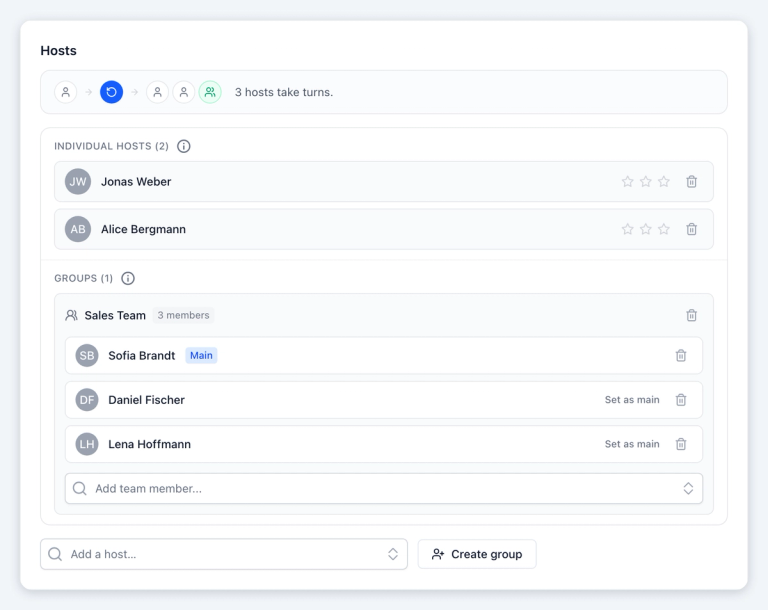
Co-host functionality has received a complete overhaul that brings clarity and control to team scheduling. Each co-host group in your round-robin queue now has a designated main host – for existing setups, this defaults to the first person in the group, but you can easily change it to whoever makes the most sense for your team.
In calendar invite mode, meetings now use the main host's calendar sync provider to create events that include both the co-host and attendee as participants. This creates a single, unified meeting event that everyone can see and manage, eliminating the confusion of multiple separate calendar entries for the same meeting.
Email confirmation mode has been refined so that co-hosts receive their meeting details via email with only themselves listed as attendees, while the main host's calendar event no longer automatically includes the attendee. This prevents duplicate notifications and ensures everyone gets exactly the information they need without overwhelming anyone with redundant messages.
These changes fix the duplicate notifications and phantom interactions that could make co-hosted meetings feel chaotic. Now everything flows logically and predictably, making team scheduling as smooth as individual appointments.
Learn co-host setup strategies
System Notifications That Actually Help
Ever had a calendar or video connection drop at the worst possible moment? The new system notifications make reconnecting almost effortless. Instead of generic error messages that leave you guessing what went wrong, you now get clear, actionable notifications that include a one-click reconnection button.
When a connection to your calendar provider or video service like Zoom gets interrupted, you'll receive a notification that explains exactly what happened and provides an immediate solution. No more digging through settings or trying to remember which service needs attention – just click the reconnect button and you're back in business.
This improvement is especially valuable for busy users who manage multiple calendar systems or frequently switch between different video platforms. The rare occasions when connections do drop will no longer derail your entire scheduling workflow.
Bonus Improvements That Make Everything Better
Swedish-speaking teams can now set Swedish as their company's default language, with full localization across all booking pages and interfaces. It's another step toward making meetergo truly global and accessible to teams wherever they are.
The Workflows interface has been refreshed to show the number of triggers and actions at a glance, along with visual improvements that make building and managing automated workflows more intuitive. You can now quickly assess the complexity and scope of your workflows without diving into each one individually.
meetergo Connect video calls now properly remember your device selections (camera, microphone, speakers) from the pre-join screen and carry them into your actual meetings. Future sessions will remember your preferences, eliminating the need to reconfigure your setup every time. We've also updated the browser compatibility notices to be more specific about Safari and Firefox limitations on Mac for features like video backgrounds and screen sharing – these are browser limitations, not meetergo issues, so we want to set proper expectations.
Finally, the participants tab in video calls now includes a refresh button for the waitlist, addressing cases where some users weren't receiving notifications to admit waiting attendees.