
Walter Pauk built this layout for a room where one person talks and everyone else writes. That constraint is baked into every part of it.
The cue column assumes you get quiet time afterwards to turn your notes into questions. The summary strip assumes the session had a single thread worth compressing into three lines. Both assumptions hold in a lecture hall. Neither holds in a Tuesday standup where you speak every ninety seconds.
So the honest version of this guide has two halves. The first is the method as Cornell University still teaches it, set up correctly, with a worked example. The second is the part most guides skip: where the layout fails, and what to change when you're a participant rather than an audience.
What Cornell method notes actually are
Pauk directed the reading and study centre at Cornell University and published the system in How to Study in College in 1962. It has outlived almost every study technique of its era for one reason. The layout forces a second pass over the material, and the second pass is where the learning happens.
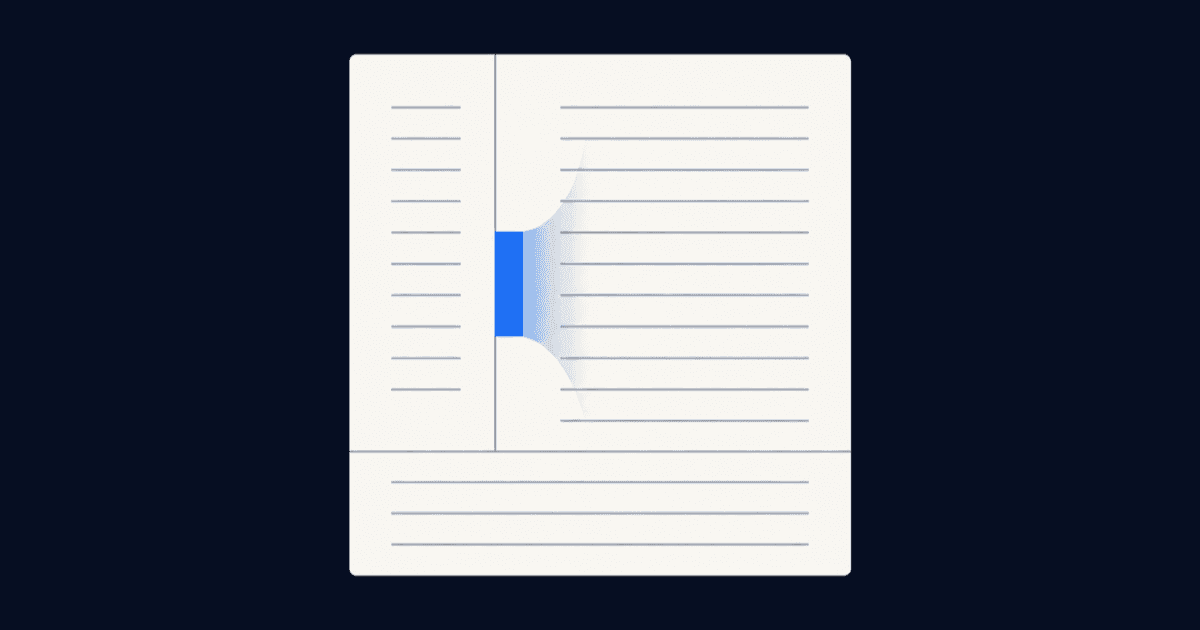
The page splits into three zones:
| Zone | Where it sits | What goes in it |
|---|---|---|
Note column | Right side, roughly two thirds of the page | Everything you capture live, during the session |
ZoneNote column Where it sitsRight side, roughly two thirds of the page What goes in itEverything you capture live, during the session | ||
Cue column | Left side, narrow strip | Questions and keywords you write afterwards, not during |
ZoneCue column Where it sitsLeft side, narrow strip What goes in itQuestions and keywords you write afterwards, not during | ||
Summary | Bottom band, full width | Two or three sentences in your own words, written last |
ZoneSummary Where it sitsBottom band, full width What goes in itTwo or three sentences in your own words, written last | ||
The order matters more than the proportions. You fill the zones in a strict sequence, and each one is written at a different time. That staggering is the method. A page with the right lines drawn on it and everything written in one sitting is not Cornell notes, it's a page with lines on it.
The Cornell Learning Strategies Center's own page on the system still hosts the canonical version, and the Wikipedia entry on Cornell Notes tracks the variants that have appeared since.
Set up the page in under a minute
Step 1: Draw the three zones
On US letter paper, the documented measurements are a cue column 2.5 inches wide down the left, and a summary band about 2 inches tall along the bottom. Everything else is the note column. On A4 that translates to roughly 6 cm and 5 cm.
Do not measure. Fold the sheet a third of the way in for the vertical line and a hand's width up from the bottom for the horizontal one. The proportions are a starting point, not a specification. If your handwriting is large, widen the note column and accept a narrower cue strip.
Step 2: Write only in the note column, live
During the lecture, the reading, or the call, the cue column and the summary band stay empty. This is the rule people break first and it costs them the whole benefit.
Capture in fragments. Skip full sentences, skip anything already on the slide, and leave a blank line whenever the speaker changes topic so you can find the seams later. If you miss something, draw a small circle in the margin instead of stopping to reconstruct it. You will fill the gap in step three.
Step 3: Cut the cue column within 24 hours
Go back to your notes the same day if you can. Read the note column and write, in the left strip, the question each block answers. Not a heading. A question.
"Photosynthesis stages" is a heading and it does nothing. "What are the three stages of photosynthesis and what does each produce?" is a cue, because you can cover the right side and try to answer it. This is retrieval practice, and it's the single mechanism that makes the layout worth the extra work. The 24-hour window is the part most people drop, and dropping it turns Cornell notes into ordinary notes with a decorative margin.
Step 4: Write the summary in your own words
Two or three sentences at the bottom, closing the page. The constraint is that no phrase may be copied from the note column. If you cannot summarise the page without lifting the speaker's wording, you did not understand it, and now you know that on the day rather than the night before an exam.
Step 5: Cover, recite, review
Fold or cover the note column so only the cues show. Answer each question out loud. Uncover and check. Cornell teaches this as the 5 R's: Record, Reduce, Recite, Reflect, Review, with reflect meaning you connect the page to what you already knew.
Ten minutes a week per subject is the realistic dose. Anyone promising you a fixed spaced-repetition schedule off the back of a paper layout is selling something.
A filled-in example
Take a forty-minute session on GDPR lawful bases. The note column ends up as fragments: six lawful bases listed, consent must be freely given and revocable, legitimate interest requires a balancing test, contract necessity is narrower than people assume, an example about a gym membership.
That evening, the cue column gets four questions. What are the six lawful bases? Why is consent the weakest basis for an employer to rely on? What three parts make up the legitimate interest test? When does contract necessity fail?
The summary band gets: "Six lawful bases, and picking the wrong one is the common failure. Consent is fragile because it can be withdrawn, so employment and service contexts usually run on contract or legitimate interest instead."
That summary is now the thing you reread. The note column is the thing you check against.
Where the Cornell method breaks
The layout has two genuine failure modes, and the second one is the interesting one.
It struggles with material that isn't linear. Anything with heavy branching, formula derivations, or spatial relationships fights the narrow-column format. A 20-plus-comment thread in r/GradSchool is titled around the method failing in graduate coursework, and the advice that surfaced there was to write far less and focus the page on genuinely new information rather than everything said. Mind-mapping and the charting method handle branching material better, and there is no prize for forcing one layout onto every subject.
It assumes you're an audience, not a participant. In a 10-plus-comment thread in r/shorthand on the Cornell system, the distinction drawn was that the method suits one-to-many informational sessions and copes poorly with anything more conversational. That matches what shows up in the work threads: a 200-plus-comment thread in r/projectmanagement on taking notes in meetings, and a 100-plus-comment thread in r/productivity on keeping notes during client meetings, are both dominated by the problem of capturing while also contributing. A cue column you never get to write is a cue column that does nothing.
Skip this method entirely if your sessions are under fifteen minutes, if you're capturing reference material you'll search rather than recall, or if you already have a working system and you're only here because a study-tips video told you Cornell notes are objectively better. They aren't. They're better at one specific job, which is recall of linear explanatory material.
One more honest note on the evidence. Cornell notes are usually defended by pointing at Mueller and Oppenheimer's 2014 study on longhand versus laptop note-taking, published in Psychological Science. It's a real finding, but a 2019 replication and extension by Morehead, Dunlosky and Rawson, published in Educational Psychology Review, did not reproduce the headline effect. The case for the cue column rests on retrieval practice, which is well supported. The case for the pen is weaker than the internet suggests.
Cornell notes for meetings: invert the workflow
Here is the fix, and it only became available in the last couple of years.
The reason Cornell fails in meetings is that the note column competes with your attention. You cannot transcribe and think at the same time when you also have to speak. But the note column is the one zone that no longer needs a human. A transcript captures it better than you can, verbatim and timestamped. The cue column and the summary are the two zones a machine is worst at, because both require knowing what mattered to you.
So invert it. Let a recorder own the note column, and keep a small physical page, or a note app pane, with only the cue strip and the summary band on it.
During the meeting you write four or five questions and nothing else. If your team already circulates meeting agendas, half the cue column is written before the call starts. Afterwards you match your questions against the transcript.

This is close to what one participant described in a 10-plus-comment r/NoteTaking thread on handwritten meeting notes: the left-hand page carries agendas, open questions and action items, the right-hand page carries the running record. Same split, different medium for each half. A second r/NoteTaking thread, with 4 comments, asks the question directly for Teams calls at work and lands on the same tension.
The practical requirement is a recorder that doesn't turn a four-person internal call into a compliance conversation. Most of the AI note-taking apps in this category join as a visible bot, which works externally and gets awkward internally.
meetergo Log is the note-capture app inside meetergo's suite, and it records microphone and system audio on your own device instead of sending a bot into the call. Transcription runs locally by default, using Whisper or Parakeet, so the audio never leaves the machine. Recording, transcription, search, export and push-to-talk dictation are free with no account, across 40+ languages, on macOS and Windows, with iOS and Android apps. Summaries are free too, though they may ask you to create an account first.
The honest gap: speaker identification, which is the feature you most want when four people are talking, sits on the paid Light tier at €9.90 per user per month, along with custom summary templates. Automatic meeting start is Suite only, at €29.90 per month. If you need to know who said what, budget for Light rather than assuming the free tier covers it.

Once the transcript exists, the summary band becomes the deliverable rather than a study aid. That's the same artefact a set of meeting minutes needs, and if you'd rather start from a structure than a blank strip, there's a meeting minutes template to work from. For recorded calls specifically, the rules on GDPR and AI meeting notes are worth reading before you switch anything on with clients in the room.
Common mistakes
- Filling the cue column during the session. The most common failure, and it defeats the purpose. Cues are written from finished notes, which is why they force you to identify what the notes were about.
- Writing headings instead of questions. A cue you cannot answer out loud is a label. Rewrite anything that doesn't end in a question mark.
- Copying the summary out of the note column. If the phrasing is borrowed, the comprehension check never happened.
- Using it for reference material. Documentation, API notes, meeting logs you'll search later: none of these need retrieval cues. Use a searchable audio-to-text tool instead and keep Cornell for material you have to hold in your head.
- Buying a pre-printed template and stopping there. The lines are the least important part. A downloaded template with empty cue columns is the same as no system at all.
Cornell versus the other layouts
| Method | Best for | Weak at |
|---|---|---|
Cornell | Linear explanatory material you need to recall | Branching topics, live discussions |
MethodCornell Best forLinear explanatory material you need to recall Weak atBranching topics, live discussions | ||
Outline | Hierarchical content with clear nesting | Anything delivered out of order |
MethodOutline Best forHierarchical content with clear nesting Weak atAnything delivered out of order | ||
Mind map | Concepts with many relationships | Dense factual detail, fast delivery |
MethodMind map Best forConcepts with many relationships Weak atDense factual detail, fast delivery | ||
Charting | Comparisons across fixed categories | Open-ended narrative sessions |
MethodCharting Best forComparisons across fixed categories Weak atOpen-ended narrative sessions | ||
Sentence | Fast, unstructured capture | Review, because nothing is prioritised |
MethodSentence Best forFast, unstructured capture Weak atReview, because nothing is prioritised | ||
Pick per session, not per person. Most people who take good notes use two or three of these depending on what's in front of them.
Start a free meetergo account and let the transcript handle the note column. No credit card, live in 30 seconds.
Booking + video conferencing in one tool.

Booking + video conferencing in one tool.
FAQs
What are the 5 R's of Cornell note-taking?
Record, Reduce, Recite, Reflect, Review. Record is the live capture in the note column. Reduce is writing the cues. Recite is answering them with the notes covered. Reflect is connecting the page to what you already knew. Review is the weekly pass.
How wide should the cue column be?
About 2.5 inches on US letter paper, roughly 6 cm on A4. Treat it as a starting point. Large handwriting needs a narrower cue strip and a wider note column, and the method still works.
Do Cornell notes work for ADHD?
There's no strong evidence either way, and anyone claiming otherwise is guessing. The structural argument is that the fixed layout removes one decision during capture, since you always know where to write. The counter-argument is that the 24-hour review step depends on follow-through, which is often the harder part. Try it for two weeks and judge on whether the cue columns actually get filled.
Can I use Cornell notes digitally?
Yes, and the constraint is different from paper. Any app with a two-pane or table layout works. The real risk is that typing makes it too easy to transcribe everything into the note column, which leaves nothing to reduce. If you want the full record anyway, that's a job for AI transcription rather than your own hands. Cap yourself on words per block rather than trusting restraint.
What are the disadvantages of Cornell notes?
It costs a second session that ordinary notes don't. It fights non-linear material. And it assumes you have time after the session to write cues, which is exactly the assumption that fails for anyone whose day is back-to-back meetings.
Is the Cornell method better than just recording the session?
They solve different problems. A recording gives you a complete record you can search, which is what you want for meeting transcription and for anything you'll reference later. Cornell gives you recall, which a recording never does, because nobody relistens. Use both: recording for the note column, cues and summary by hand.