
Key Takeaways
- The Pipedrive Meeting Scheduler is a solid CRM-native booking tool, but it's locked behind the Advanced plan ($27.90/user/month yearly) and not available on the Essential plan.
- Pipedrive is US-incorporated, which means EU Standard Contractual Clauses apply but US authorities can still access data under the CLOUD Act, a real liability for EU sales teams.
- EU teams typically pair meetergo with Pipedrive: meetergo handles the GDPR-compliant booking front-end while all meeting data syncs into the Pipedrive CRM pipeline.
- meetergo's round-robin scheduling is Premium-only at €49.90/user/month for the first year (regular €59.90), billed yearly; Pipedrive requires its Professional plan at $49.90/user/month for the same capability.
Pipedrive's meeting scheduler does one thing well: it keeps scheduled meetings inside your CRM without manual data entry. But for EU sales teams, that CRM convenience comes with a data residency question that Pipedrive's own documentation doesn't fully answer.
This guide walks through how the Pipedrive meeting scheduler works, what it actually costs, where it falls short, and why many European sales teams use meetergo alongside Pipedrive rather than relying on the native scheduler alone.
Pipedrive Meeting Scheduler at a Glance
| Feature | Available | Notes |
|---|---|---|
Plan required | Advanced+ | Not included in Essential plan |
FeaturePlan required AvailableAdvanced+ NotesNot included in Essential plan | ||
Calendar sync | Yes | Google Calendar, Outlook |
FeatureCalendar sync AvailableYes NotesGoogle Calendar, Outlook | ||
Buffer times | Yes | Configurable per event type |
FeatureBuffer times AvailableYes NotesConfigurable per event type | ||
Video integration | Via third-party | Zoom, Google Meet, Teams (requires separate subscription) |
FeatureVideo integration AvailableVia third-party NotesZoom, Google Meet, Teams (requires separate subscription) | ||
CRM sync | Yes | Meetings log to deals and contacts automatically |
FeatureCRM sync AvailableYes NotesMeetings log to deals and contacts automatically | ||
GDPR / EU data residency | No | US-incorporated; EU SCCs apply but CLOUD Act risk remains |
FeatureGDPR / EU data residency AvailableNo NotesUS-incorporated; EU SCCs apply but CLOUD Act risk remains | ||
Who Is Pipedrive's Meeting Scheduler Best For?
Ideal users:
- Sales teams already on Pipedrive CRM. If your pipeline, deals, and contacts already live in Pipedrive, the native scheduler cuts the friction of keeping two systems in sync.
- Account executives running demos. A single booking link that auto-creates a deal activity means less admin before and after a call.
- Recruiting teams using Pipedrive as a lightweight ATS. The scheduler handles interview booking without a separate tool.
Who should look elsewhere:
- EU-regulated businesses. Companies processing personal data under GDPR need data residency guarantees that Pipedrive currently can't provide for its US-based infrastructure.
- Teams not using Pipedrive CRM. The scheduler's main value is CRM sync. Without that, you're paying for an Advanced plan for a feature that standalone tools like meetergo offer for free.
Key Features
Shareable Booking Link With Time Zone Conversion
The Pipedrive meeting scheduler generates a personal booking link you can paste into emails, LinkedIn messages, or email signatures. Prospects pick a slot from your live availability, and Pipedrive converts times to their local time zone automatically.
This is standard for any modern scheduler. What makes Pipedrive's version useful is where the confirmation lands: directly on the associated deal or contact record, with no manual note entry.
The honest limitation: the booking page branding options are limited. You get a Pipedrive-hosted page with your name and logo, but custom domain hosting or full white-labeling requires workarounds or a third-party tool.
Direct CRM Pipeline Integration
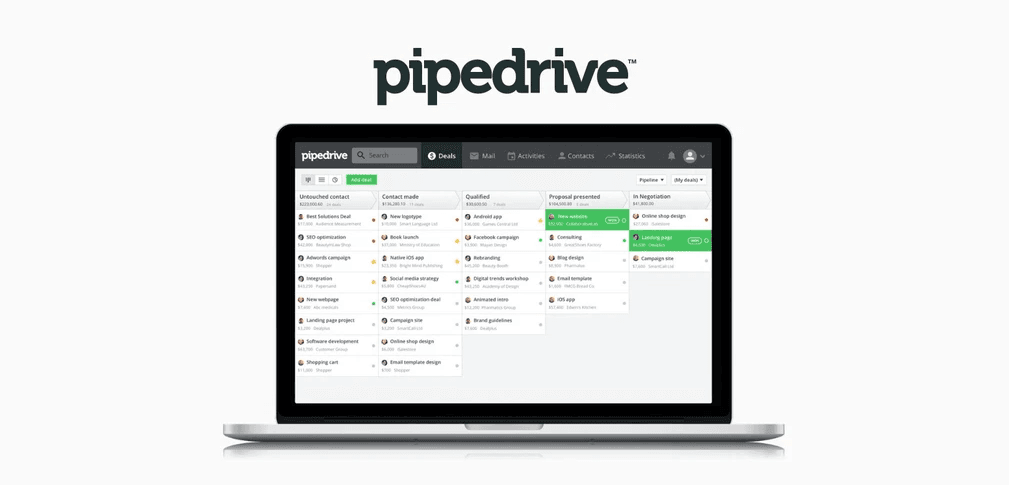
When a prospect books a meeting, Pipedrive logs it as an activity tied to the relevant deal and contact. Reminders fire automatically, and the meeting shows up in your pipeline view.
For sales teams running high-volume outbound, this is the real value. You don't need to switch between a booking tool and your CRM after every booked call. The meeting record, the contact, and the deal stage update together.
Sales reps spend roughly 12% of their weekly time on scheduling logistics, around 4.8 hours per week, according to Forrester's Activity Study. For a 5-person sales team, that's 24 hours a week where automatic CRM logging and availability sync can recover meaningful selling time.
The limitation: this integration depth only matters if you're already using Pipedrive's deal pipeline. Teams using HubSpot, Salesforce, or a simpler CRM won't benefit from this tight coupling. See our overview of sales CRM scheduling features for a broader comparison.
Buffer Times and Availability Templates
Buffer times let you block 10 or 15 minutes before and after meetings, preventing back-to-back calls from stacking without breaks. Pipedrive supports this natively, and you can set different availability windows per event type.
For example: product demos run 45 minutes with a 15-minute buffer; discovery calls run 30 minutes with a 10-minute buffer. Each gets its own link and availability template.
This is table-stakes functionality for scheduling tools, but Pipedrive implements it cleanly without requiring a separate configuration interface. If you want more control over availability rules and booking workflows, dedicated scheduling tools offer more granular options.
Video Conferencing Integrations
Pipedrive integrates with Zoom, Google Meet, and Microsoft Teams to auto-generate video links for booked meetings. When a prospect books a slot, the confirmation email includes the video link.
There is no built-in video conferencing. You need an active Zoom, Meet, or Teams account. For teams using Zoom, that means at least a Zoom Pro plan ($13.33/month per user on annual billing) on top of the Pipedrive Advanced plan. See Zoom's pricing page for current rates.
This matters for cost calculations. If you're EU-based and want a GDPR-compliant Zoom alternative with built-in encrypted video, the cost picture looks different once you add the Zoom subscription.
Round-Robin Scheduling for Teams
Pipedrive supports round-robin booking, which distributes incoming meeting requests across team members based on availability. Prospects see one booking link; the meeting routes to whoever is free next.
The catch: round-robin is only available on the Professional plan and above ($49.90/user/month yearly). If you're on Advanced and want round-robin, you're looking at a plan upgrade. For teams where round-robin is central to how leads get routed, this is a significant cost jump.
meetergo's round-robin scheduling is in Premium at €49.90/user/month for the first year (regular €59.90), billed yearly, while Pipedrive gates it behind Professional at $49.90/user/month.
Pipedrive Meeting Scheduler Pricing
The meeting scheduler is not a separate add-on. It's included with the Advanced plan and above. There's no way to get it on Essential without upgrading.
| Plan | Annual Price (per user/mo) | Monthly Price (per user/mo) | Scheduler Included? |
|---|---|---|---|
Essential | $14.90 | $24.90 | No |
PlanEssential Annual Price (per user/mo)$14.90 Monthly Price (per user/mo)$24.90 Scheduler Included?No | |||
Advanced | $27.90 | $44.90 | Yes |
PlanAdvanced Annual Price (per user/mo)$27.90 Monthly Price (per user/mo)$44.90 Scheduler Included?Yes | |||
Professional | $49.90 | $64.90 | Yes |
PlanProfessional Annual Price (per user/mo)$49.90 Monthly Price (per user/mo)$64.90 Scheduler Included?Yes | |||
Power | $64.90 | $74.90 | Yes |
PlanPower Annual Price (per user/mo)$64.90 Monthly Price (per user/mo)$74.90 Scheduler Included?Yes | |||
Enterprise | $99.00 | $99.00 | Yes |
PlanEnterprise Annual Price (per user/mo)$99.00 Monthly Price (per user/mo)$99.00 Scheduler Included?Yes | |||
Prices from Pipedrive's pricing page. Per-user pricing means a 5-person sales team on Advanced costs $139.50/month annually before any video conferencing costs.
For teams evaluating total cost, the jump from Essential to Advanced to unlock the scheduler adds $13/user/month. That's real money, especially for smaller teams. It's worth comparing against dedicated scheduling tools that include booking, video, and GDPR compliance without a per-user CRM tax.
Where Pipedrive's Scheduler Shines
- Zero CRM data entry after a booked call. Activities, contacts, and deal stages update automatically, which saves meaningful time at scale.
- Native availability detection. Calendar sync is reliable, and double-booking protection works without manual overlap checks.
- Clean email signature link workflow. The booking link fits into outbound sequences naturally, with no redirect or third-party domain.
- Time zone handling. International sales teams report fewer "you said 3pm, I thought 3pm my time" problems once they switch to the booking link.
- Works well with Pipedrive's existing automation. If you already use Pipedrive workflows, the scheduler fits into existing trigger/action chains.
Where It Falls Short
- No GDPR/EU data residency. Pipedrive is US-incorporated. Booking data from EU clients flows through US-accessible infrastructure. We cover this in detail in the next section.
- No built-in video. Every video meeting requires a Zoom, Meet, or Teams subscription. For small teams, this adds $13-15/user/month before taxes on top of Pipedrive's plan cost.
- Plan lock at Advanced ($27.90/user/month). There's no lightweight add-on option. Essential plan users need a full upgrade to access the scheduler.
- No standalone option. You can't use the Pipedrive scheduler without a Pipedrive subscription. Teams that want a dedicated booking tool with CRM sync have better options.
The GDPR Gap: A Real Risk for EU Sales Teams
Pipedrive is incorporated in the United States. When EU sales teams book calls with clients, those booking interactions (names, email addresses, company details) pass through Pipedrive's infrastructure.
Pipedrive offers EU Standard Contractual Clauses (SCCs), which are a legal mechanism for transferring personal data from the EU to third countries. SCCs help, but they don't eliminate the core issue: Pipedrive as a US entity is subject to the CLOUD Act and FISA Section 702. Under these laws, US authorities can compel access to data held by US companies, regardless of where servers are physically located.
For EU companies processing client data under GDPR, this creates a gap between contractual compliance and technical risk. The full GDPR text is clear on data processor obligations. A Data Protection Officer at a German financial services firm, for example, would face hard questions if a booking tool's data residency couldn't be verified.
This is why GDPR compliance strategies for scheduling tools matter, and why EU teams often look for a GDPR-compliant Calendly alternative or Pipedrive supplement that keeps booking data on EU infrastructure. See also our overview of GDPR compliance for US companies selling into the EU market.
meetergo + Pipedrive: A Better Setup for EU Teams
The goal isn't to replace Pipedrive. It's to close the GDPR gap without giving up the CRM pipeline you've built.
Here's how the setup works in practice: meetergo handles the client-facing booking page, GDPR consent capture, and video call infrastructure. All meeting data syncs into Pipedrive through the CRM integration, so your deal activities, contact records, and pipeline stages still update automatically.
What meetergo adds to the stack:
- EU data residency: servers in Nuremberg, Germany, ISO 27001 certified
- Built-in encrypted video: no Zoom subscription required; video booking is native
- Round-robin on Premium: team routing is Premium-only at €49.90/user/month for the first year (regular €59.90), billed yearly
- GDPR consent flows: built-in consent capture at booking, which is relevant for B2B and B2C use cases
- Lead capture mode: lead capture booking flows let you qualify prospects before they book
- Free forever plan: meetergo Free is €0 forever with unlimited users and all 15 apps at starter limits
The honest limitation: meetergo doesn't replicate Pipedrive's depth of sales pipeline management. If deal stages, activity sequences, and sales reporting are central to your workflow, Pipedrive remains the right CRM. meetergo's role is the booking front-end, not CRM replacement.
Pricing (per user/month, billed yearly; 7-day trial on paid plans):
- Free: €0 forever, unlimited users; all 15 apps at starter limits
- Light: €9.90/user/month billed yearly; one chosen app fully unlocked
- Suite: €29.90/user/month first year (regular €34.90), billed yearly; all 15 apps with full standard features
- Premium: €49.90/user/month first year (regular €59.90), billed yearly; round-robin and team scheduling, lead routing, WhatsApp Business, custom domain/CNAME, custom SMTP, and white label
Try meetergo free: GDPR-compliant scheduling that connects to Pipedrive. Nuremberg servers, built-in video, free forever plan.
How to Choose: Pipedrive Scheduler vs Standalone Booking Tool
Are you and your prospects EU-based?
If your clients are in Germany, France, the Netherlands, or anywhere else subject to GDPR, the Pipedrive scheduler's US data infrastructure is a compliance concern. A standalone tool with EU hosting (like meetergo) keeps booking data within EU jurisdiction. This matters most if you're in finance, healthcare, legal, or any sector where a DPO reviews your vendor stack.
Do you need built-in video?
If calls frequently happen over video, add Zoom costs to your Pipedrive plan cost before comparing. Pipedrive doesn't include video. meetergo includes encrypted video on all plans. For teams doing 20+ video calls a week, the math shifts quickly.
Are you already on Pipedrive Advanced+?
If you're already paying for Advanced, Professional, or above, the scheduler is already included and switching costs are high. In that case, using Pipedrive's native scheduler for non-EU prospects and meetergo for EU clients is a practical hybrid. Both tools can run simultaneously; you don't need to pick one exclusively.
Stop juggling tools. Scheduling meets sales pipeline.

Stop juggling tools. Scheduling meets sales pipeline.
Verdict
The Pipedrive meeting scheduler is a well-built CRM-native tool for sales teams already committed to Pipedrive's pipeline. The automatic deal and contact logging is genuinely useful, calendar sync is reliable, and the booking link workflow fits naturally into outbound sequences.
The real limits are the plan lock (Advanced minimum), the absence of built-in video, and the GDPR data residency gap. For US-focused teams, these won't matter. For EU sales teams (or any business where data residency is reviewed by a DPO), pairing Pipedrive with meetergo is the more defensible setup. You keep the CRM you've invested in while moving the booking infrastructure to EU-hosted, GDPR-ready ground.
Read our full guide to meeting scheduling software for a broader comparison across tools.
FAQ
Do I need a special Pipedrive plan for the meeting scheduler?
Yes. The Pipedrive meeting scheduler requires the Advanced plan at minimum ($27.90/user/month on annual billing). It's not available on the Essential plan. Round-robin team scheduling requires the Professional plan or higher.
Does Pipedrive's Meeting Scheduler work with Google Calendar?
Yes. Pipedrive syncs with Google Calendar and Microsoft Outlook. When a meeting is booked, it appears on your calendar and is logged as an activity in your Pipedrive pipeline. Double-booking protection works through the calendar sync.
Is Pipedrive's Meeting Scheduler GDPR compliant?
Pipedrive offers EU Standard Contractual Clauses and a Data Processing Agreement. However, as a US-incorporated company, Pipedrive is subject to the CLOUD Act, which means US authorities can access data regardless of SCC status. For EU teams with strict data residency requirements, this is a known limitation. See G2 reviews for how users rate Pipedrive's compliance handling. Read what GDPR actually requires if you need to assess this for your business.
Can I use Pipedrive's scheduler without a Zoom account?
You can use it without Zoom if you prefer Google Meet or Microsoft Teams. But there's no built-in video; you need at least one of those three services active to auto-generate video links. If you want built-in encrypted video without a third-party subscription, you'd need a dedicated scheduling tool like meetergo.
How does meetergo integrate with Pipedrive?
meetergo connects to Pipedrive through its CRM integration. When a prospect books through meetergo, the meeting is logged as a Pipedrive activity and linked to the appropriate contact or deal. This gives you GDPR-compliant booking on the front end with full Pipedrive pipeline visibility on the back end. See our overview of what Pipedrive CRM is and whether Pipedrive has a free plan for more context on the full platform.