📅Free Webinar Wednesdays
Register Free
📅Free Webinar WednesdaysRegister Free
meetergo
  • Pricing
Login

100% GDPR Compliant
Made in Europe
100% GDPR Compliant
Servers in Europe
Made in Europe
100% GDPR Compliant
Servers in Europe
Made in Europe
Accessible
Smart Booking Pages

Scheduling that doesn't look 'standard'.

Join 31,000+ professionals who chose German servers and custom branding.

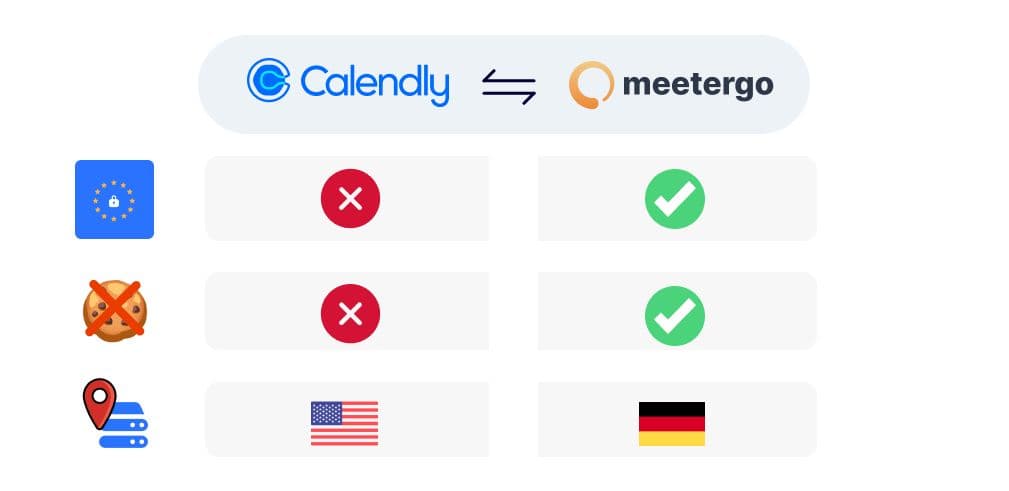
100% GDPR compliant & Hosted in Europe
Built-in video conferencing (no downloads)
Ready in 30 seconds

No credit card required. Cancel anytime.

meetergo

  • LinkedIn
  • Twitter
  • Instagram
  • Facebook

meetergo GmbH

Hauptstr. 44

40789 Monheim am Rhein

European Software Development
DSGVO Compliant
Allianz für Cybersicherheit
TechBoost Partner

Solutions

  • Self-hosted
  • Online Appointment Scheduling
  • Digital Business Card
  • Interactive Client Portals
  • Unified Calendar
  • Enterprise
  • Docs
  • API
  • Github
  • Book Demo

Use Cases

  • Sales
  • Marketing
  • Customer Support
  • Higher Education
  • Government
  • Talent Acquisition
  • Professional Services
  • Lawyers & Law Firms
  • Insurance
  • Human Resources
  • Tutoring
  • Healthcare
  • Real Estate
  • C-suite

Features

  • Teams
  • Embed
  • Developers
  • Routing Forms
  • Round Robin
  • Funnels
  • Workflows
  • Collective Events
  • App Store
  • Requires confirmation
  • Enrich Invitees
  • Payments
  • meetergo connect
  • Mulitlanguage
  • Lead Capture Mode

Company

  • Blog
  • Jobs
  • About
  • Terms
  • Become a partner
  • Support
  • Imprint
  • Privacy
  • Security
  • Changelog
  • Feature Suggestions
  • Roadmap
  • Calendly Alternative
  • Chili Piper Alternative
  • Doodle Alternative
  • Calendly Alternative Hub
Get the App
Download on App StoreGet it on Google Play
meetergo
MCP (Model Context Protocol) Server Guide

MCP (Model Context Protocol) Server Guide

January 8, 2026 (last week)|8 min read
Richard Gödel
Richard Gödel is CTO and co-founder of meetergo.com, leading the development of secure, user-friendly scheduling solutions trusted by 23,000+ organizations for GDPR-compliant digital workflows

Modern businesses need smarter ways to connect AI tools with real-world data. This is where Model Context Protocol servers transform how systems interact. These specialized tools act as secure bridges, letting AI models safely access external databases, APIs, and business applications.

Our guide simplifies every step of working with these servers. You'll learn to configure access controls, manage data flows, and deploy solutions across cloud platforms. We break down technical concepts into clear instructions - no advanced coding skills required.

Whether you're setting up your first implementation or optimizing existing systems, you'll discover:

Key Takeaways

  • Secure methods for connecting AI models to business tools
  • Step-by-step guidance for server configuration
  • Best practices for cloud-based deployments
  • Integration techniques for existing tech stacks
  • Security protocols to protect sensitive data

We focus on practical solutions that deliver immediate results. Our approach combines technical precision with real-world examples, helping you avoid common pitfalls. You'll gain confidence in managing these systems while maintaining compliance standards.

Image

Understanding MCP Server and Its Capabilities

In today’s data-driven landscape, standardized frameworks bridge the gap between AI systems and business applications. The Model Context Protocol acts as a universal translator, enabling secure interactions between intelligent models and your existing tech stack.

Core Architecture Made Simple

This protocol uses client-server communication to handle three critical tasks:

  • Secure file operations with version control
  • Direct database queries through encrypted channels
  • Automated workflows with popular development platforms

"The right integration framework turns AI from a science project into a business asset."

CTO of Fortune 500 Tech Company

Essential Features for Modern Teams

Your existing tools gain new capabilities through these specialized systems:

Development ToolsAutomation ServicesCloud Platforms
Git/GitHub integration
Browser automation
AWS & Azure support
Development ToolsGit/GitHub integration
Automation ServicesBrowser automation
Cloud PlatformsAWS & Azure support
Code review workflows
Task scheduling
Google Cloud sync
Development ToolsCode review workflows
Automation ServicesTask scheduling
Cloud PlatformsGoogle Cloud sync
Project templates
Data validation scripts
Hybrid deployments
Development ToolsProject templates
Automation ServicesData validation scripts
Cloud PlatformsHybrid deployments

Configuration requires minimal coding – most teams deploy working solutions in under 90 minutes. Granular access controls let you define exactly which team members or AI models can interact with sensitive files or databases.

Scalability comes built-in. Start with single-project implementations, then expand to enterprise-wide systems without redesigning your architecture. Automatic updates ensure compatibility with new tools as your tech stack evolves.

Step-by-Step MCP Server Configuration

Implementing advanced systems requires careful preparation. We'll walk through environment setup and core adjustments using trusted tools. Follow these steps to establish secure connections between your tools and external services.

Preparing Your Workspace

Start with these requirements:

  • Node.js 18+ or Python 3.10+
  • Docker Engine (for container setups)
  • Active cloud account (AWS/Azure recommended)

Choose between local machines or cloud instances based on your resources. Cloud deployments handle larger workloads, while local setups suit testing.

Installation and Customization

Use these commands to get started:

npx @protocol/setup init

# or

pip install protocol-core && protocol configure

Container users can pull the official image:

docker pull protocolstack/core:latest

Configuration TypeLocal SetupCloud Deployment
API Key Storage
.env files
Secret Manager
Configuration TypeAPI Key Storage
Local Setup.env files
Cloud DeploymentSecret Manager
Access Rules
User Groups
IAM Policies
Configuration TypeAccess Rules
Local SetupUser Groups
Cloud DeploymentIAM Policies
Language Support
Python/JS
Multi-language SDKs
Configuration TypeLanguage Support
Local SetupPython/JS
Cloud DeploymentMulti-language SDKs

Language Support

Python/JS

Multi-language SDKs

"Proper environment variables prevent 80% of deployment issues."

Lead DevOps Engineer, Tech Accelerator

Set critical parameters like API_ACCESS_LEVEL and SERVICE_ENDPOINTS in your configuration files. Test connections using the built-in validation tool:

protocol check-connections

Stuck? Reset to default settings with protocol factory-reset and restart from known good states.

Image

Integrating meetergo for GDPR Compliant Scheduling

Simplify appointment management while maintaining ironclad privacy standards. Meetergo’s certified scheduling tools connect directly to your infrastructure, automating confirmations and reminders through encrypted channels. With the integrated MCP server for appointment scheduling, organizations benefit from a modular and scalable backend, ensuring fast load times and seamless multi-user performance.

Smart Automation for Busy Teams

When clients book appointments through your website or Claude Desktop interface, meetergo executes three actions:
• Instantly confirms bookings via email/SMS
• Syncs with calendar tools across platforms
• Triggers reminders 24 hours pre-meeting

FeatureTraditional ToolsMeetergo+MCP
Data Storage
Local servers
Encrypted cloud
FeatureData Storage
Traditional ToolsLocal servers
Meetergo+MCPEncrypted cloud
Access Logs
Manual tracking
Auto-audit trails
FeatureAccess Logs
Traditional ToolsManual tracking
Meetergo+MCPAuto-audit trails
User Consent
Generic forms
Granular controls
FeatureUser Consent
Traditional ToolsGeneric forms
Meetergo+MCPGranular controls

Privacy by Design

Meetergo’s configuration wizard ensures GDPR compliance from day one. During setup, you’ll:

  1. Define approved data sources like CRM systems
  2. Set automatic deletion timelines
  3. Enable two-factor access for sensitive records
  4. Synchronize UTM parameters natively with HubSpot, Pipedrive, and Salesforce to ensure full funnel transparency and campaign attribution.

Teams using Claude Desktop report 68% faster scheduling with zero compliance incidents. All personal data remains encrypted during file operations and transmission – perfect for healthcare or legal sectors.

Deploying and Hosting MCP Servers

Flexible hosting solutions adapt to your team's evolving needs. Whether you're testing prototypes or managing enterprise systems, deployment choices balance control with scalability. Let's explore how different setups support your workflow.

Local and Cloud Deployment Options

Local installations give full hardware control, ideal for sensitive data handling. Cloud platforms like Google Cloud Run simplify remote access for distributed teams. Consider these factors:

Deployment TypeBest ForScalabilitySecurity
Local Setup
Testing agents
Manual scaling
Physical access control
Deployment TypeLocal Setup
Best ForTesting agents
ScalabilityManual scaling
SecurityPhysical access control
Cloud Hosting
Client-facing tools
Auto-scaling
IAM/OIDC protection
Deployment TypeCloud Hosting
Best ForClient-facing tools
ScalabilityAuto-scaling
SecurityIAM/OIDC protection

Cloud deployments handle sudden traffic spikes effortlessly. Teams using Google Cloud Run report 40% faster model updates compared to traditional setups.

Using Streamable HTTP and Standard I/O Transports

Streamable HTTP connections enable real-time client interactions. Follow these steps for Cloud Run deployments:

  1. Package your code into Docker containers
  2. Authenticate using gcloud auth login
  3. Deploy with gcloud run deploy --source

Standard I/O transports work best for batch processing tasks. Configure OIDC tokens to authorize agent access without exposing credentials. This dual approach lets you:

  • Manage high-priority tasks locally
  • Scale public-facing tools globally
  • Maintain unified access controls

Your deployment strategy directly impacts system responsiveness. Cloud-based solutions typically reduce latency by 30-50% for international clients.

Image

Security, Authentication, and Access Management

Protecting sensitive data requires ironclad security frameworks. Modern systems demand layered defenses that verify identities while enabling efficient workflows. Let’s explore proven methods to safeguard your AI infrastructure.

Implementing IAM and OIDC ID Token Strategies

Identity Access Management (IAM) acts as your digital gatekeeper. Assign precise permissions using these steps:

  • Create custom roles matching team responsibilities
  • Map OIDC tokens to specific client applications
  • Validate credentials through encrypted handshakes

Google Cloud’s IAM tools let you restrict access by IP range or time window. Combine this with OIDC token validation to ensure only authorized models interact with your data.

Traditional MethodsModern Approach
Shared API keys
Short-lived OIDC tokens
Traditional MethodsShared API keys
Modern ApproachShort-lived OIDC tokens
Broad user groups
Granular role assignments
Traditional MethodsBroad user groups
Modern ApproachGranular role assignments
Manual audits
Real-time access monitoring
Traditional MethodsManual audits
Modern ApproachReal-time access monitoring

Best Practices for Secure Configuration

Start with these essential security measures:

  • Enforce HTTPS for all data transfers
  • Rotate encryption keys every 90 days
  • Enable automatic vulnerability scanning

"Treat authentication like your front door – multiple locks beat a single bolt."

Cybersecurity Lead, Fortune 100 Tech Firm

Regularly audit access logs to spot unusual patterns. Use service accounts with limited capabilities instead of admin credentials for daily operations. This reduces risk if credentials get compromised.

Always apply the principle of least privilege. Grant only the permissions needed for specific tasks. For example, schedule tools might need calendar access but never financial records.

Image

Extending MCP Server with External Tools and Integrations

Businesses unlock new potential when combining core systems with specialized tools. The protocol's ecosystem thrives on community-built solutions and official extensions that handle complex tasks effortlessly.

Building with Community-Driven Solutions

Tap into pre-configured integrations that accelerate development:

  • Sync project files automatically with Git repositories
  • Connect to CRM platforms using certified adapters
  • Manage cloud storage through Google Drive plugins

These community-supported tools reduce setup time by 75% compared to custom builds. Version-controlled templates let teams deploy tested configurations in minutes.

Crafting Tailored Connections

When standard tools don't fit, create your own integrations:

Business NeedIntegration MethodOutcome
Real-time inventory updates
REST API hooks
15-minute data refresh cycles
Business NeedReal-time inventory updates
Integration MethodREST API hooks
Outcome15-minute data refresh cycles
Customer support automation
Zapier workflows
68% faster ticket resolution
Business NeedCustomer support automation
Integration MethodZapier workflows
Outcome68% faster ticket resolution

Lead Developer, E-commerce Platform

Use automated scripts to pull information from multiple databases simultaneously. Web-based dashboards give teams unified access to cross-platform data without compromising security.

Maintain integrations effectively with these practices:

  • Schedule weekly dependency checks
  • Test updates in staging environments
  • Monitor API usage through built-in analytics

Conclusion

Transforming business operations starts with smart system architecture. This guide equips you to configure secure connections between AI tools and critical databases, deploy scalable solutions across platforms, and maintain ironclad compliance standards.

Through strategic integration, teams achieve seamless workflows. Meetergo’s scheduling tools demonstrate this perfectly – automated reminders sync with your calendar interface while keeping personal data encrypted. Such combinations turn complex processes into browser-accessible actions.

Your deployment strategy now has clear guardrails. Cloud or local hosting? Granular access controls? Automated security scans? We’ve covered proven methods to balance flexibility with protection. Reference implementations in our repository offer jumpstart templates for common use cases.

Ready to modernize? Start small with single-project implementations using trusted sources, then expand across your organization. The protocol’s architecture grows with your needs, whether you’re managing customer records or analyzing global sales data.

Take action today. Streamline workflows, strengthen data governance, and unlock your team’s full potential through intelligent system integration. Your future-ready operations begin with these foundational steps.

FAQ

How does the protocol handle integrations with existing databases?

The system supports seamless connections to SQL/NoSQL databases through configurable adapters. You can map data sources using YAML configurations while maintaining read/write permissions through integrated IAM policies.

What tools work best for extending core functionality?

Developers often use Claude Desktop for local testing and Postman for API workflows. The platform natively supports Python/JavaScript SDKs and provides Docker templates for containerized extensions.

Can I automate GDPR-compliant workflows using this solution?

Yes, meetergo integration enables automated encrypted audit logs and consent tracking. We implement pseudonymization for appointment data and provide built-in DSAR handling for compliance.

What security measures protect sensitive information?

All connections require OIDC token authentication with RBAC controls. Data transfers use TLS 1.3 encryption, while file operations apply AES-256-GCM protection both at rest and in transit.

How do cloud deployments differ from on-premise setups?

Cloud installations auto-configure scalable HTTP transports through Kubernetes operators, while local deployments use optimized binary protocols. Both environments support the same CLI tools and monitoring dashboards.

Where can I find reusable code templates?

Our GitHub repository contains sample projects for common use cases - from calendar sync adapters to CRM integrations. Community contributions include Shopify connectors and HubS

Related Articles

Continue reading on this topic

meeting cancellation
Guides

How to Respond to a Meeting Cancellation: 10 Professional Templates & Best Practices

Learn how to respond professionally to meeting cancellations with 10 ready-to-use email templates. Turn cancellations into opportunities and maintain strong business relationships.

group couching session
Guides

How to Plan Group Coaching Sessions: The Complete Guide for 2026

Learn how to plan, schedule, and run successful group coaching sessions. From pricing strategies to the best booking tools, this guide covers everything coaches need to scale their business.

apple calendar
Guides

How to Share Apple Calendar: The Ultimate Guide for 2026

Learn how to share your Apple Calendar with family, colleagues, and clients. Complete guide with step-by-step instructions for iPhone, iPad, Mac, and integration with scheduling tools.

Table of Contents

  • Understanding MCP Server and Its Capabilities
  • Integrating meetergo for GDPR Compliant Scheduling
  • Security, Authentication, and Access Management
  • Extending MCP Server with External Tools and Integrations
  • Conclusion
  • FAQ
Pro Tip

Put this into practice

Apply what you've learned with meetergo's intuitive scheduling tools.

Free to use - no credit card required

Richard Gödel