Transcribe meetings.Without a bot joining the call.
meetergo Log runs locally on your laptop: capture meetings, and dictate into any input field with one key. No cloud, no notetaker in the participant list, free.
Checking compatibility…
macOS: 50.0 MB · Windows: 53.1 MB
Three ways to stop taking notes
Customer call 2:00 PM
Quote by Friday
Book follow-up
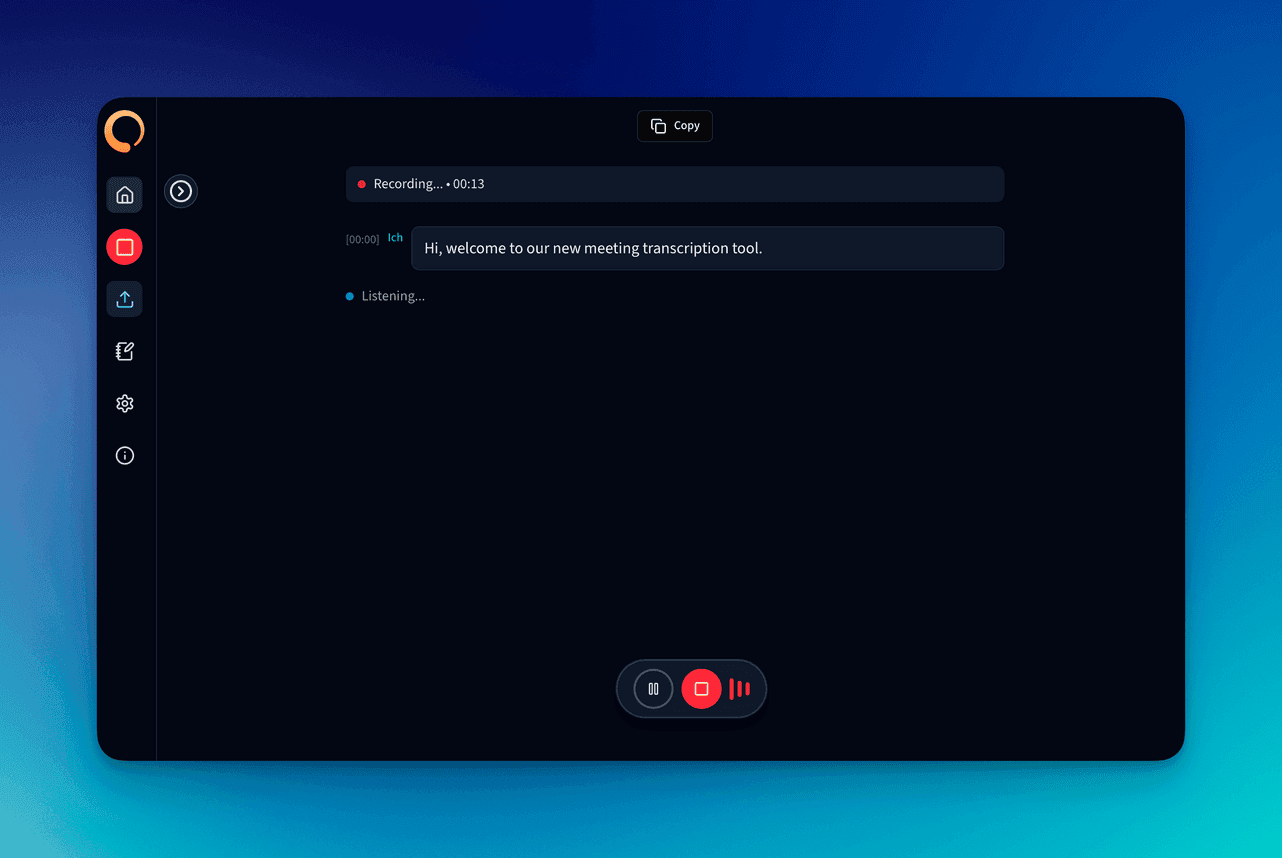
This is what a finished protocol looks like.
Why local?
Cloud notetakers upload your meeting to someone else's servers. meetergo Log transcribes straight on your machine: faster, more private, free.
No bot. No cloud. No tracking.
Audio, transcripts and dictations stay on your device. We never see them.
You're handing your meetings to servers you don't control.
Every cloud notetaker uploads your audio over the internet, often to US servers, often training on your data, and not everyone on the call has agreed.
A stranger in every single call
“Otter Notetaker is recording” is awkward in front of clients and often legally questionable in the EU.
Recordings are processed on US servers
Even if the UI promises EU, transcription, diarization and storage usually live in the US.
Your conversations train someone else's model
On free plans “use data to improve our service” is usually the default. You're in those datasets.
$0 quickly becomes $20–30 per user per month
Free tier limits are tight enough that any team running real meetings gets squeezed into a paid plan.
meetergo Log flips this on its head.
Recording, transcription and dictation run 100% on your device. No bot, no cloud, no hidden cost. Open-source models, your hardware, your data. And if you do want a bot, the optional cloud notetaker runs in the EU rather than the US.
How your meeting moves through meetergo Log
Three stations, all on your device. There is no fourth step.
Microphone / system audio
Your mic and the audio of your meeting app
Your device (Whisper, local)
Transcription right on your laptop
Finished transcript
Saved as a file on your machine
Not part of this data flow:
Turn off your Wi-Fi and it still works.
From download to first transcript
No signup to transcribe. No configuration. Install the app, grant audio access, hit start. That's it.
Free download
A native app for macOS or Windows. No extensions, no browser plug-in.
Allow audio access
Grant system audio + mic once. Works with Zoom, Teams, Meet, Discord & WebEx.
Transcribe locally
Whisper runs straight on your Mac or PC. Apple Silicon and NVIDIA GPUs are fully utilized.
Summary & export
Structured notes and export as Markdown, PDF or JSON. Speaker labels and your own templates need an account on the Light plan.
Free download
A native app for macOS or Windows. No extensions, no browser plug-in.
macOS 50.0 MB · Windows 53.1 MB · signed
Allow audio access
Grant system audio + mic once. Works with Zoom, Teams, Meet, Discord & WebEx.
No bots in the call
Transcribe locally
Whisper runs straight on your Mac or PC. Apple Silicon and NVIDIA GPUs are fully utilized.
100% offline possible
Summary & export
Structured notes and export as Markdown, PDF or JSON. Speaker labels and your own templates need an account on the Light plan.
Your own templates on Light
Dictate instead of typing. Into any input field.
Hold a key, speak, let go. The text appears wherever your cursor is. Transcription happens on your device, not in the cloud.
Default: right Command key. Rebindable.
Write a message …
Works everywhere you already type:
Transcribed locally
The same local engine your meetings use, Whisper or Parakeet as you prefer. No upload, no account, works in airplane mode.
Lands at your cursor
The text is inserted right where you were writing. Your clipboard is handed back untouched.
No limits
No minute quota, no dictation credits. As often a day as you like.
Switch it on once in settings. Up to two minutes per dictation. A short sound tells you when the mic is live.
Everything you need. Nothing you don't.
A lean native app. Transcribe and dictate without an account. No tracking. Just what honest meeting capture needs, plus a dictation shortcut you will use all day.
100% on your device
Audio, transcripts, dictations and summaries never leave your computer.
Push-to-talk dictation
Hold a key, speak, let go. The text lands in whatever input field your cursor sits in.
No bot in the call
Captures system audio directly. Nobody sees that you're recording.
A cloud notetaker if you want one
For meetings you're not at your machine for: it joins Meet, Teams, Zoom and meetergo connect itself. Paid plans.
Whisper on your hardware
Optimised for Apple Silicon and NVIDIA GPUs. Over 60 languages out of the box.
Speaker diarization
Automatically labels who said what, even without a cloud diarization API. Account on the Light plan.
Custom templates
Sales calls, discovery, 1:1s. You define exactly how your notes are shaped. Account on the Light plan.
Works offline
Train, plane, sensitive boardroom: no internet needed, dictation included.
Trust you can actually measure
Teams already running on meetergo




The notetaker that starts working before the call begins.
No laptop, no install, nothing to start by hand. It joins your meetings itself, briefs you beforehand, catches no-shows and writes the summary and tasks afterwards.
Joins automatically on:
 meetergo connect
 Google Meet
 Microsoft Teams
 Zoom
ZoomA briefing instead of a cold start
It reads the transcripts of every earlier conversation with this contact and maps them onto your sales framework.
- What was actually said last time
- Which framework fields are still empty
- MEDDIC, SPIN, BANT or your own grid
Briefing: Lena Brandt, Head of Ops
From 3 earlier conversations
- Metrics: 12 h/week of manual scheduling
- Economic Buyer: CFO has not been on a call yetopen
- Decision Criteria: GDPR, SSO, HubSpot sync
- Decision Process: Q4 budget sign-off still openopen
- Identify Pain: 22% no-show rate in support
- Champion: Lena, driving it internally
It joins, and it remembers what really happened
It dials in on its own at the start, takes notes, and logs the meeting the way it actually ran.
- Joins automatically, nobody has to start anything
- No-shows are detected and flagged on the meeting
- The real duration replaces the booked one in your calendar
Today's calendar
- Discovery: Lena Brandt10:0018:42 instead of the 30 min booked
- Follow-up: M. Ortmann11:30Nobody joined, flagged as a no-show
Summary and tasks, unprompted
Before you close the window the result is already on the contact: recap, decisions, next steps.
- Summary in your own template
- Tasks with owners and due dates
- All on the contact and the deal, not in a second tool
Recap written
- Lena needs two-way HubSpot sync before the rollout.
- Budget sits with the CFO, no meeting booked yet.
- Pilot with 8 support users is agreed.
Tasks
- Send quote with pilot scopeby Fri
- Ask Lena for a CFO meetingtoday
- Share SSO documentationnext week
Saved on the contact automatically
The cloud notetaker is part of the paid plans: 10 recaps a month on Light, unlimited from Suite upwards including recordings. Local transcription and dictation stay free and unlimited.
The difference in four rows
No verdicts, just the architecture. The Otter and Fireflies entries come from their own documentation.
| meetergo Log | Otter.ai | Fireflies | |
|---|---|---|---|
| Where does transcription run? | Locally on your device | Cloud-based service per Otter's terms | Fireflies' US cloud by default (AWS/GCP) |
| Visible bot in the meeting? | No | Notetaker: visible guest; Chrome extension: botless | Notetaker: visible participant; desktop app: also botless |
| Where does the conversation data live? | On your device | AWS S3 | US cloud infrastructure by default (AWS/GCP) |
| Price | Desktop app free, dictation included | Free Basic: 300 transcription minutes/month; paid plans | Free plan; paid Pro, Business, and Enterprise plans |
Official sources, retrieved July 17, 2026: Otter terms, Otter Notetaker, Otter privacy & security, Otter pricing; Fireflies desktop app, Fireflies data storage, Fireflies pricing.
Cleared up before you download
Download meetergo Log
Drop your email and we'll send the download link for macOS and Windows. Local transcription and push-to-talk dictation included, no account needed.
Get the download link by email
Drop your email and we'll send the macOS and Windows link straight over.
We'll send you the download link. Without the tick you get nothing else from us.
macOS
50.0 MB
Windows
53.1 MB
Linux
You have the recording. meetergo Suite makes the meeting happen in the first place.
meetergo Log turns every call into a searchable note. meetergo Suite gets the meeting on the calendar: booking, routing, reminders, video, contracts and pipeline inside one tool.
Booking on your brand
Your own domain, branding and smart routing instead of a generic Calendly popup.
WhatsApp & SMS reminders
Cut no-shows in half. Automated reconfirmation and reschedule links included.
Native video platform
Branded video calls without a Zoom seat. Right in the browser, no download required.
Contracts in the booking flow
Forms, e-signatures and payments live inside the booking flow, not a second tool.
Mini CRM & pipeline
Every booking becomes a deal. Status, notes and follow-ups stay visible in one place.
Workflows & webhooks
HubSpot, Salesforce, Slack, n8n, Zapier: via native integrations or webhooks.
With meetergo Log
You can capture every meeting privately.
With meetergo Suite
You get the meetings booked, and actually close them.
Start without an account · No credit card · Ready in minutes
Download meetergo Log and put your meetings on private.
Installed in under a minute. Transcription and dictation run locally, internet or not. You stay in control of every second of audio.